
We’ve all been there—stuck in the repetitive grind of building APIs over databases, wishing there was a faster, more efficient way to get the job done. That’s exactly the frustration that led to the creation of Data API Builder (DAB). Instead of getting bogged down in the tedium of manually crafting each endpoint, DAB does all the work, allowing you to focus on the parts of your project that truly need your attention and expertise.
Simplifying API Creation
DAB is all about simplicity and efficiency. The entire process revolves around a configuration file where you specify the entities—whether they’re tables, views, or stored procedures—that you want to expose as either REST or GraphQL endpoints (or both). Here’s what that configuration might look like:
{
    "$schema": "https://github.com/Azure/data-api-builder/releases/download/v0.6.13/dab.draft.schema.json",
    "data-source": {
        "database-type": "mssql",
        "connection-string": "Server=localhost;Database=Library;Integrated Security=true;TrustServerCertificate=true"
    },
    "runtime": {
        "rest": {
            "enabled": true,
            "path": "/api"
        },
        "graphql": {
            "allow-introspection": true,
            "enabled": true,
            "path": "/graphql"
        },
        "host": {
            "mode": "development",
            "cors": {
                "origins": [],
                "allow-credentials": false
            },
            "authentication": {
                "provider": "StaticWebApps"
            }
        }
    },
    "entities": {
        "Author": {
            "source": "dbo.Author",
            "permissions": [
                {
                    "role": "anonymous",
                    "actions": [
                        "*"
                    ]
                }
            ],
            "relationships": {
                "Books": {
                    "cardinality": "many",
                    "target.entity": "Book",
                    "linking.object": "dbo.BookAuthor"
                }
            }
        },
        "Book": {
            "source": "dbo.Book",
            "permissions": [
                {
                    "role": "anonymous",
                    "actions": [
                        "*"
                    ]
                }
            ],
            "relationships": {
                "Authors": {
                    "cardinality": "many",
                    "target.entity": "Author",
                    "linking.object": "dbo.BookAuthor"
                }
            }
        }
    }
}
Let’s break this down a bit. The data-source section specifies that the database type is mssql for SQL Server, along with the necessary connection string. In the runtime section, you can see that both REST and GraphQL endpoints are enabled, each with their own respective URI paths. The entities section defines which entities should be exposed—in this case, the Book and Author tables. These tables are linked in a many-to-many relationship through the BookAuthor junction table. This configuration file essentially maps out how your API will interact with your database, making it easy to expose the desired data while maintaining control over access and structure.
One of the great things about DAB is that you don’t have to manage this configuration file manually. You get a CLI that lets you to maintain and update the configuration without ever needing to dive into the raw JSON. This makes it even easier to adapt and scale your API as your project grows, ensuring that your endpoints stay in sync with your database structure.
Once the configuration is set and the API is started, clients can issue requests to the REST and GraphQL endpoints. For example, issuing an HTTP GET request to the following REST endpoint retrieves books with more than 500 pages, sorted by the page count, and returns just the title of each book:
http://localhost:5000/api/Book?$filter=Pages gt 500&$orderby=Pages&$select=Title
REST vs. GraphQL: Choosing the Right Approach
When building APIs, the choice between REST and GraphQL often comes down to the structure of your data and the needs of your application. REST is the more traditional approach, where each endpoint is designed to interact with a single entity. For instance, if you need to retrieve an author and their books, you might have to make multiple REST calls: one to get the author details and another to fetch the associated books. While this model is straightforward and well-suited for many applications, it can lead to over-fetching or under-fetching of data, especially in more complex scenarios.
GraphQL, on the other hand, allows for more flexibility and efficiency by enabling clients to specify exactly what data they need in a single request. This is particularly powerful when dealing with related entities. In a GraphQL query, you can request an author along with all their related books in a single call, effectively returning a graph of interconnected data. This not only reduces the number of requests made to the server but also provides a more efficient way to handle complex data structures.
With Data API Builder (DAB), this flexibility is seamlessly integrated. DAB automatically constructs the appropriate SQL statements to join related tables based on the relationships defined in your configuration. This means that whether you’re exposing your data via REST or GraphQL, DAB handles the complexity behind the scenes, allowing you to focus on the higher-level logic of your application.
Why DAB is a Game-Changer for CRUD Operations
When it comes to CRUD operations—Create, Read, Update, Delete—DAB really shines. It takes the hassle out of providing secure, direct access to your database tables (and views) by generating the necessary endpoints automatically. There’s no need to write any code yourself; DAB handles it all, giving you immediate access to your data through a clean, consistent API. This is a massive time-saver, especially for developers who need to quickly spin up APIs for internal tools, prototypes, or even production applications.
Exposing Stored Procedures
If exposing your tables directly doesn’t align with your security needs or architectural preferences, DAB allows you to add a layer of control by using stored procedures. This way, you can shield your tables from direct access and instead expose only the business logic that you want to make available via the API. This approach gives you the best of both worlds: easy API generation with the ability to enforce business rules and data security.
Supporting Multiple Databases
DAB supports multiple database platforms, making it a valuable tool in a variety of environments. For relational databases like SQL Server, Azure SQL Database, and MySQL, DAB delivers a seamless experience. Once you specify the entities in your configuration file, DAB creates REST endpoints that allow for straightforward interaction with your data. Additionally, it generates GraphQL endpoints that can join related rows, enabling you to fetch an entire entity graph in one go, which is especially powerful in complex applications.
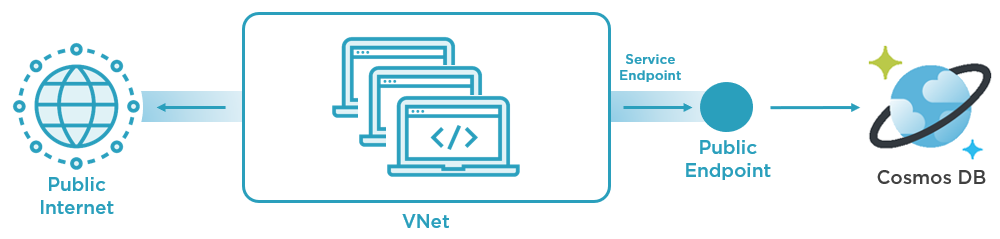
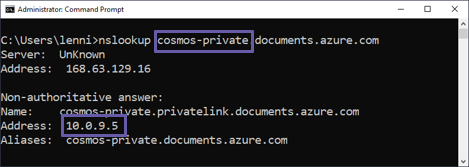
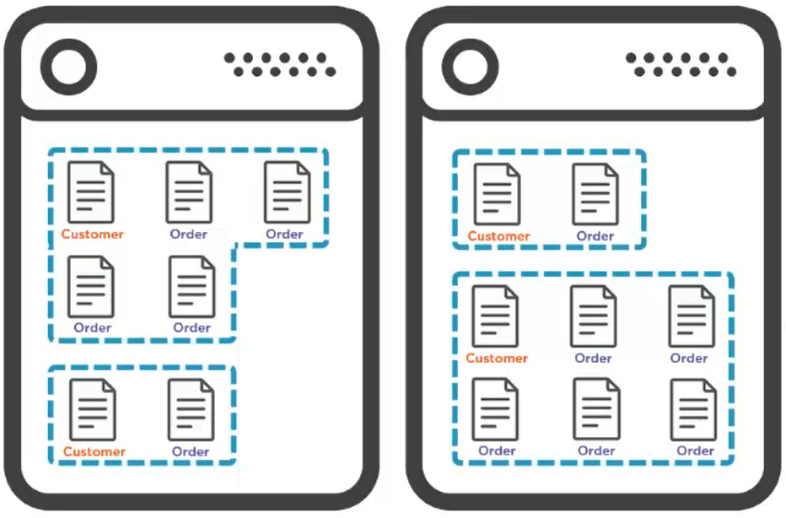
On the other hand, if you’re working with Azure Cosmos DB, you might find DAB’s advantages less intriguing. That’s because Cosmos DB already comes with a native REST API, which provides CRUD operations out of the box. Furthermore, because Cosmos DB is a NoSQL database with a denormalized data model, it doesn’t naturally benefit from the joining capabilities that make GraphQL so compelling. In these cases, while DAB can still be used, the value proposition is different, focusing more on standardization and ease of use rather than on adding new capabilities.
Securing Your APIs with DAB
Security is a top concern in any API, and DAB offers robust support for various security models to help you protect your data. One of the most powerful features is its support for Role-Based Access Control (RBAC) with Microsoft Entra ID, which allows you to enforce role-level security. This means you can ensure that users only have access to the data they’re authorized to view, adding an essential layer of protection to your API. Additionally, DAB enables filtering based on user context through database policies. These policies dynamically adjust the data returned based on who is making the request, providing a more tailored and secure API experience.
For example:
"authentication": {
    "provider": "AzureAD",
    "jwt": {
        "issuer": "https://login.microsoftonline.com/<tenant-id>/v2.0",
        "audience": "<client-id>"
    }
}
This configuration enables authentication using Entra ID, specifying the issuer and audience for JWT validation. It ensures that only users authenticated through your Entra ID setup can access the API, providing a secure and manageable way to control access based on organizational roles and policies.
Then you can fine-tune access to specific entities. For example:
"Book": {
    "source": "dbo.Book",
    "permissions": [
        {
            "role": "Book.Reader",
            "actions": ["read"]
        },


    {
            "role": "Book.Librarian",
            "actions": ["*"]
        }
    ]
}
This configuration enables readonly access to the Books entity for users assigned to the Book.Reader role. Meanwhile, users in the Book.Librarian role have full read-write access to the Books entity. Unauthenticated users, or those not in these roles, will have no access at all. This granular control over who can perform what actions on which data is crucial for building secure, role-based APIs that align with your business rules and security policies.
Best Practices for Using DAB
While DAB is designed to be easy to use, following best practices can help you avoid common pitfalls and get the most out of the tool. One important best practice is to keep your configuration files organized, especially if you’re working across multiple environments like development, staging, and production. By maintaining separate configuration files for each environment, you can avoid issues that might arise from deploying the wrong settings. This organization helps ensure that your APIs behave consistently across different stages of your development and deployment process.
It’s also crucial to optimize your queries to ensure that you’re only fetching the data you need. Over-fetching data can lead to performance bottlenecks, particularly in high-traffic environments, so fine-tuning your queries is essential. Additionally, leveraging caching, logging, and monitoring can further enhance performance and help you quickly identify and resolve any issues that arise. Paying attention to these details ensures that your APIs not only perform well but also remain secure and easy to maintain. By following these best practices, you can maximize the effectiveness of DAB and ensure that your API development process is as smooth and efficient as possible.
Ready to Learn More?
If you’re eager to get started with DAB, there are some great resources available to help you hit the ground running. The official documentation is a fantastic place to start, offering quickstarts and comprehensive guides. This documentation will walk you through everything from the initial setup to more advanced configurations, ensuring you have a solid understanding of how to make the most of DAB. It’s an invaluable resource whether you’re just getting started or looking to deepen your knowledge.
In addition to the documentation, the GitHub repository is another excellent resource. Here, you can explore the source code, check out sample projects, and even contribute to the ongoing development of DAB. Seeing the code in action can provide valuable insights into how DAB works under the hood and how you can customize it to fit your specific needs. Together, these resources offer a comprehensive toolkit for mastering DAB and integrating it into your development workflow.