


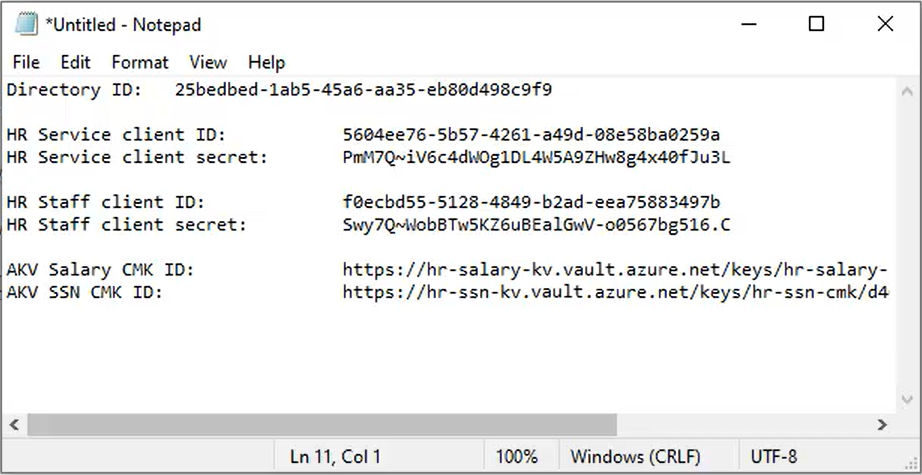
In my two previous posts, I introduced client-side encryption (also known as Always Encrypted), and showed you how to configure the client-side encryption resources (app registrations, client secrets, and key vaults) using the Azure portal. We finished up by gathering all the values you’ll need to supply to the client applications that need to perform cryptography (encryption and decryption) over your data, and we have these values readily available in Notepad:
- Azure AD directory ID
- Two HR application client IDs
- Two HR application secrets
- Two customer-managed key IDs
So now we’re ready to building the two client applications, HR Service and HR Staff. Create both of these as two distinct console applications using Visual Studio. In each one, create an empty appsettings.json file and set its Copy to Output Directory property to Copy always.
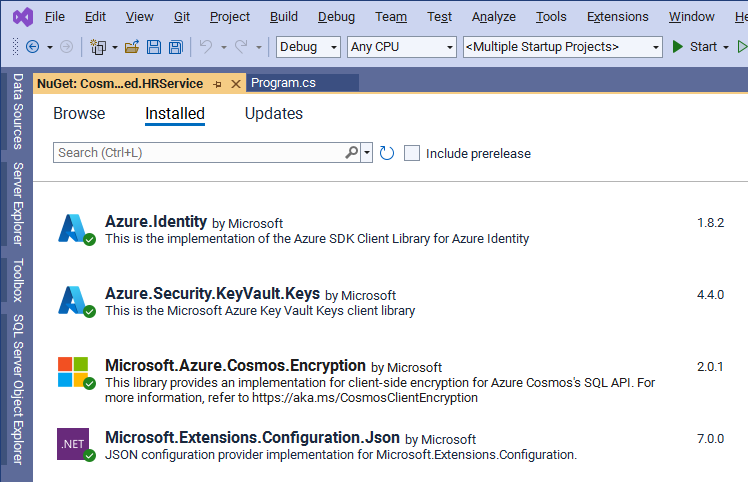
Let’s start with the HR Service application, and first take note of these NuGet packages you’ll need to install:
Now over to appsettings.json for the configuration. Paste in the Azure AD directory ID, and then the client ID for the HR Service application, along with its client secret. That’s all configuration that’s normally needed for an application accessing an existing container that’s configured for Always Encrypted, but in this demo, the HR Service application will also be creating the employees container and configuring it for client-side encryption on the two properties salary and ssn. And so, in order to do that, it also needs the key identifiers for both of those CMKs. So finally, also paste in the ID for the salary CMK, and then the ID for the social security number CMK.
The appsettings.json file for the HR Service application should look like this:

First, import all the namespaces we’ll need with these using statements at the top of
using Azure.Identity;
using Azure.Security.KeyVault.Keys.Cryptography;
using Microsoft.Azure.Cosmos;
using Microsoft.Azure.Cosmos.Encryption;
using Microsoft.Extensions.Configuration;
using Newtonsoft.Json;
using System;
using System.Diagnostics;
using System.Linq;
using System.Threading.Tasks;
Now create an empty Main method in Program.cs where we’ll write all the code for this demo:
static async Task Main(string[] args)
{

}
Start with our configuration object loaded from appsettings.json, and pick up the endpoint and master key to our Cosmos DB account. Then we pick up the three Azure AD values for the directory ID, and the HR Service’s client ID and client secret:
// Get access to the configuration file
var config = new ConfigurationBuilder().AddJsonFile("appsettings.json").Build();

// Get the Cosmos DB account endpoint and master key
var endpoint = config["CosmosEndpoint"];
var masterKey = config["CosmosMasterKey"];

// Get AAD directory ID, plus the client ID and secret for the HR Service application
var directoryId = config["AadDirectoryId"];
var clientId = config["AadHRServiceClientId"];
var clientSecret = config["AadHRServiceClientSecret"];
We want a Cosmos client that’s configured to support client-side encryption based on the access policies defined in Azure Key Vault for the HR Service application, so we first encapsulate the Azure AD directory ID, client ID and client secret inside a new ClientSecretCredential, and then get a new Azure Key Vault key resolver for that credential:
// Create an Azure Key Vault key resolver from the AAD directory ID with the client ID and client secret
var credential = new ClientSecretCredential(directoryId, clientId, clientSecret);
var keyResolver = new KeyResolver(credential);
Now we can create our Cosmos client as usual, but with an extra extension method to call WithEncryption on the key resolver:
// Create a Cosmos client with Always Encrypted enabled using the key resolver
var client = new CosmosClient(endpoint, masterKey)
    .WithEncryption(keyResolver, KeyEncryptionKeyResolverName.AzureKeyVault);
And now to create the database and container. The database is simple; we just call CreateDatabaseAsync, and then GetDatabase to create the human-resources database:
// Create the HR database
await client.CreateDatabaseAsync("human-resources");
var database = client.GetDatabase("human-resources");
Console.WriteLine("Created human-resources database");
The container is a bit more involved, since we need to set the encryption for the salary and social security number properties. And the way this works is by creating a data encryption key – or DEK – for each. So in fact, the properties will be encrypted and decrypted by the DEK, not the CMK itself. The DEK then gets deployed to Cosmos DB, but remember that Cosmos DB can’t encrypt and decrypt on its own. So the DEK itself is encrypted by the CMK before it gets sent over to Cosmos DB.
So, first get the key identifier for the salary CMK from appsettings.json, and wrap it up inside an EncryptionKeyWrapMetadata object. Then we can call CreateClientEncryptionKeyAsync on the database to create a data encryption key named salaryDek which will use the SHA256 algorithm for encrypting the salary property, where again, the DEK itself is encrypted by the CMK referenced in the wrap metadata object we just created:
// Create salary data encryption key (DEK) from the salary customer-managed key (CMK) in AKV;
var salaryCmkId = config["AkvSalaryCmkId"];
var salaryEncryptionKeyWrapMetadata = new EncryptionKeyWrapMetadata(
type: KeyEncryptionKeyResolverName.AzureKeyVault, name: "akvMasterKey", value: salaryCmkId, algorithm: EncryptionAlgorithm.RsaOaep.ToString());
await database.CreateClientEncryptionKeyAsync( clientEncryptionKeyId: "salaryDek", DataEncryptionAlgorithm.AeadAes256CbcHmacSha256, salaryEncryptionKeyWrapMetadata);
Console.WriteLine("Created salary database encryption key")
And then it’s the same for the social security number CMK. We get its key identifier from appsettings.json, wrap it up as EncryptionKeyWrapMetadata, and call CreateClientEncryptionKeyAsync to create the data encryption key named ssnDek:
// Create SSN data encryption key (DEK) from the SSN customer-managed key (CMK) in AKV
var ssnCmkId = config["AkvSsnCmkId"];

var ssnEncryptionKeyWrapMetadata = new EncryptionKeyWrapMetadata(
    type: KeyEncryptionKeyResolverName.AzureKeyVault,
    name: "akvMasterKey",
    value: ssnCmkId,
    algorithm: EncryptionAlgorithm.RsaOaep.ToString());

await database.CreateClientEncryptionKeyAsync(
    "ssnDek",
    DataEncryptionAlgorithm.AeadAes256CbcHmacSha256,
    ssnEncryptionKeyWrapMetadata);

Console.WriteLine("Created SSN database encryption key");
The last step before we can create the container is to bind each of these DEKs to their respective properties. This means creating a new ClientEncryptionIncludePath that points to the salary property in each document and is tied to the salary DEK. We also need to set the encryption type which can be either Randomized or Deterministic. So if you were wondering how it’s possible for Cosmos DB to query on an encrypted property without being able to decrypt it, the answer is in the encryption type. If you don’t need to query on an encrypted property, then you should set the type to Randomized like we’re doing here:
// Define a client-side encryption path for the salary property
var path1 = new ClientEncryptionIncludedPath()
{
    Path = "/salary",
    ClientEncryptionKeyId = "salaryDek",
    EncryptionAlgorithm = DataEncryptionAlgorithm.AeadAes256CbcHmacSha256.ToString(),
    EncryptionType = EncryptionType.Randomized, // Most secure, but not queryable
};
Using the randomized encryption type generates different encrypted representations of the same data, which is most secure, but also means it can’t be queried against on the server-side.
On the other hand, since the HR Service application will need to query on the social security number, we create a similar ClientEncryptionIncludePath for the ssn property and its corresponding DEK, only this time we’re setting the encryption type to be Deterministic:
// Define a client-side encryption path for the SSN property
var path2 = new ClientEncryptionIncludedPath()
{
    Path = "/ssn",
    ClientEncryptionKeyId = "ssnDek",
    EncryptionAlgorithm = DataEncryptionAlgorithm.AeadAes256CbcHmacSha256.ToString(),
    EncryptionType = EncryptionType.Deterministic, // Less secure than randomized, but queryable
};
This means that a given social security number will always generate the same encrypted representation, making it possible to query on it. Again though, Deterministic is less secure than Randomized, and can be easier to guess at – particularly for low cardinality values, such as booleans for example – which is why you only want to choose Deterministic when you need to be able to query on the value with SQL, server-side.
And now we can create the container. Here we’ll use the fluent style of coding supported by the SDK, where you chain multiple methods together in a single statement to build a container definition, and then create a container from that definition. In this case we call DefineContainer to name the container employees, using the ID itself as the partition key. We tack on WithClientEncryptionPolicy, and then a WithIncludePath method for each of the two properties we’re encrypting client-side. Then Attach returns a container builder for the client encryption policy, on which we can call CreateAsync to create the container, with throughput provisioned at 400 RUs a second.
This creates the employees container, which we can then reference by calling GetContainer:
// Create the container with the two defined encrypted properties, partitioned on ID
await database.DefineContainer("employees", "/id")
    .WithClientEncryptionPolicy()
    .WithIncludedPath(path1)
    .WithIncludedPath(path2)
    .Attach()
    .CreateAsync(throughput: 400);

var container = client.GetContainer("human-resources", "employees");

Console.WriteLine("Created employees container with two encrypted properties defined");
OK, we’re ready to create some documents and see client-side encryption in action:
// Add two employees
await container.CreateItemAsync(new
{
    id = "123456",
    firstName = "Jane",
    lastName = "Smith",
    department = "Customer Service",
    salary = new
    {
        baseSalary = 51280,
        bonus = 1440
    },
    ssn = "123-45-6789"
}, new PartitionKey("123456"));

await container.CreateItemAsync(new
{
    id = "654321",
    firstName = "John",
    lastName = "Andersen",
    department = "Supply Chain",
    salary = new
    {
        baseSalary = 47920,
        bonus = 1810
    },
    ssn = "987-65-4321"
}, new PartitionKey("654321"));

Console.WriteLine("Created two employees; view encrypted properties in Data Explorer");
Console.WriteLine("Press any key to continue");
Console.ReadKey();
Console.WriteLine();
Here we’re calling CreateItemAsync to create two employee documents. Inside each document we’ve got both salary and ssn properties in clear text, but it’s the SDK’s job to encrypt those properties before the document ever leaves the application. So let’s run the HR Service application up to this point, and have a look at these documents in the database.
Heading on over to the data explorer to view the documents, and sure enough, both the salary and ssn properties are encrypted in the documents:
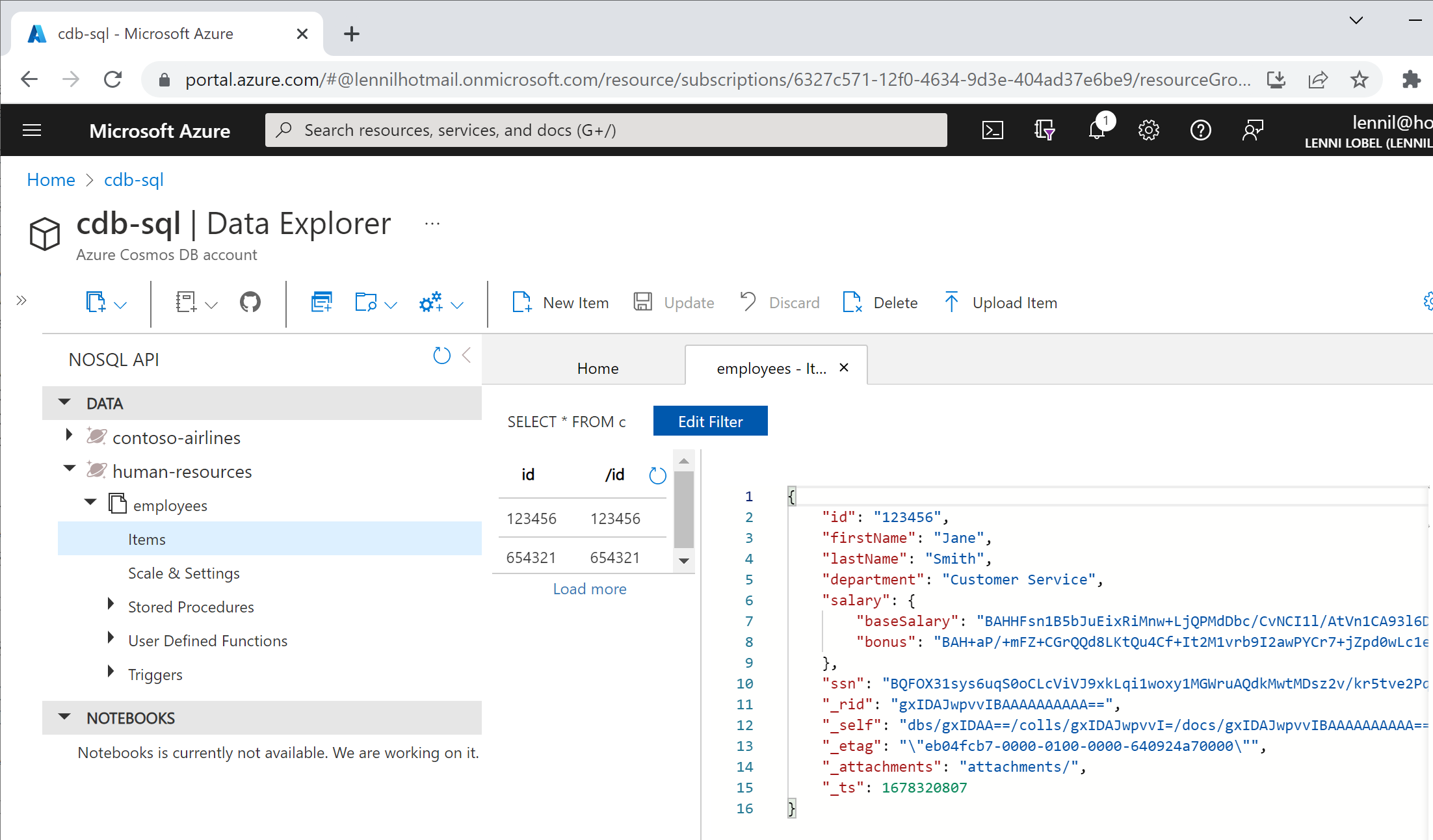
Remember, these properties can be decrypted only by client applications with access to the required CMKs, while Cosmos DB can never decrypt these values. Also notice that the salary property is actually a nested object holding base salary and bonus values – both of which have been encrypted as two separate parts of the parent salary property. This is significant because, at least now, the client-side encryption policy is immutable – you can’t add or remove encrypted properties once you’ve created the container. But because of the schema-free nature of JSON document in Cosmos DB, you can easily create a single property for client-side encryption, and then dynamically add new properties in the future that require encryption as nested properties, like we’re doing here for salary.
Back to the last part of the HR Service application to retrieve documents from the container. First we’ll do a point read on one document, by ID and partition key – which are both the same in this case since we’ve partitioned on the ID property itself:
// Retrieve an employee via point read; SDK automatically decrypts Salary and SSN properties
var employee = await container.ReadItemAsync("123456", new PartitionKey("123456"));
Console.WriteLine("Retrieved employee via point read");
Console.WriteLine(JsonConvert.SerializeObject(employee.Resource, Formatting.Indented));
Console.WriteLine("Press any key to continue");
Console.ReadKey();
Console.WriteLine();
And sure enough, we can see the document with both salary and ssn properties decrypted:
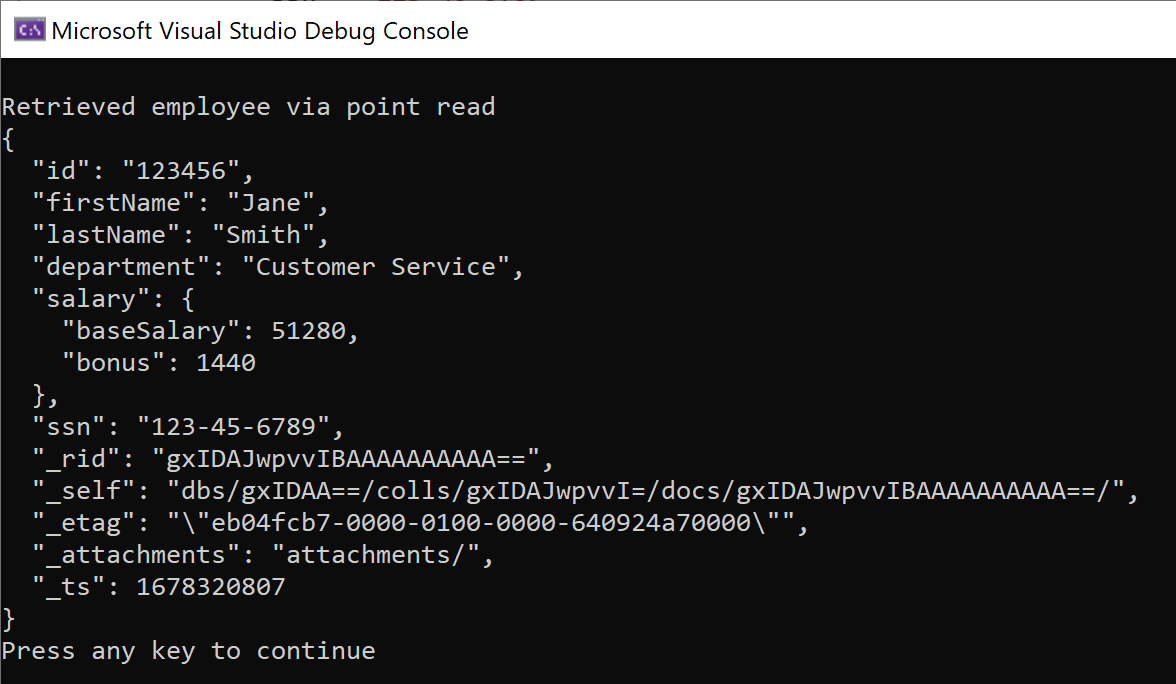
Remember though, that the document was served to the application with those properties encrypted like was just saw in the data explorer. It’s the .NET SDK that is transparently decrypting them for the HR Service application, since that application is authorized to access the CMKs from Azure Key Vault for both properties.
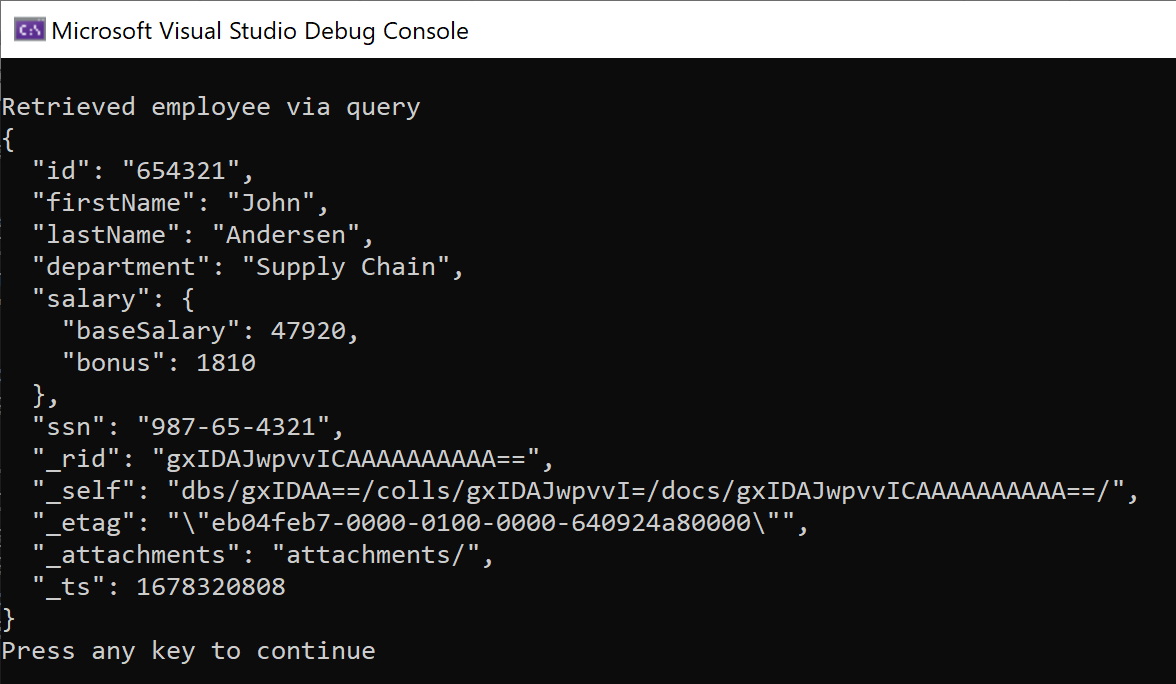
Finally, let’s see if we can query on the social security number. This should work, since we’re using deterministic encryption on that property, but it needs to be a parameterized query (as shown below). You can’t simply embed the clear text of the social security number you’re querying right inside the SQL command text since, again, remember that the SDK needs to deterministically encrypt that parameter value before the SQL command text ever leaves the application:
// Retrieve an employee via SQL query; SDK automatically encrypts the SSN parameter value
var queryDefinition = container.CreateQueryDefinition("SELECT * FROM c where c.ssn = @SSN");
await queryDefinition.AddParameterAsync("@SSN", "987-65-4321", "/ssn");

var results = await container.GetItemQueryIterator(queryDefinition).ReadNextAsync();
Console.WriteLine("Retrieved employee via query");
Console.WriteLine(JsonConvert.SerializeObject(results.First(), Formatting.Indented));
Console.WriteLine("Press any key to continue");
Console.ReadKey();
Console.WriteLine();
And, sure enough, this works as we’d like. The SDK encrypted the SSN query parameter on the way out, and decrypted both Salary and SSN properties on the way back in:
So now, let’s wrap it up with a look at the HR Staff application.
Let’s first update appsettings.json, and plug in the Azure AD values that’s we’ve copied into Notepad. That’s the same directory ID as the HR Service application, plus the client ID and client secret we have just for the HR Staff application:

And now, over to the code in Program.cs, starting with these namespace imports up top:
using Azure.Identity;
using Azure.Security.KeyVault.Keys.Cryptography;
using Microsoft.Azure.Cosmos;
using Microsoft.Azure.Cosmos.Encryption;
using Microsoft.Extensions.Configuration;
using Newtonsoft.Json;
using System;
using System.Diagnostics;
using System.Threading.Tasks;
Next, prepare to write all the code inside an empty Main method:
static async Task Main(string[] args)
{
}
Inside the Main method, we get similar configuration as the HR Service application. We grab the endpoint and master key, plus the Azure AD directory, and the client ID and client secret defined for the HR Staff application. And then we wrap up the Azure AD information in a ClientSecretCredential, which we use to create an Azure key vault key resolver for a new Cosmos client, just like we did in the HR Service application.
// Get access to the configuration file
var config = new ConfigurationBuilder().AddJsonFile("appsettings.json").Build();

// Get the Cosmos DB account endpoint and master key
var endpoint = config["CosmosEndpoint"];
var masterKey = config["CosmosMasterKey"];

// Get AAD directory ID, plus the client ID and secret for the HR Staff application
var directoryId = config["AadDirectoryId"];
var clientId = config["AadHRStaffClientId"];
var clientSecret = config["AadHRStaffClientSecret"];

// Create an Azure Key Vault key store provider from the AAD directory ID with the client ID and client secret
var credential = new ClientSecretCredential(directoryId, clientId, clientSecret);
var keyResolver = new KeyResolver(credential);

// Create a Cosmos client with Always Encrypted enabled using the key store provider
var client = new CosmosClient(endpoint, masterKey)
    .WithEncryption(keyResolver, KeyEncryptionKeyResolverName.AzureKeyVault);

// Get the employees container
var container = client.GetContainer("human-resources", "employees");
Now let’s run a query. Usually, SELECT * is no problem, but that includes the ssn property which the HR Staff application cannot decrypt. And so we expect this query to fail. Let’s see:
// Try to retrieve documents with all properties
Console.WriteLine("Retrieving documents with all properties");
try
{
    // Fails because the HR Staff application is not listed in the access policy for the SSN Azure Key Vault
    await container.GetItemQueryIterator("SELECT * FROM C").ReadNextAsync();
}
catch (Exception ex)
{
    Console.WriteLine("Unable to retrieve documents with all properties");
    Console.WriteLine(ex.Message);
    Console.WriteLine("Press any key to continue");
    Console.ReadKey();
    Console.WriteLine();
}
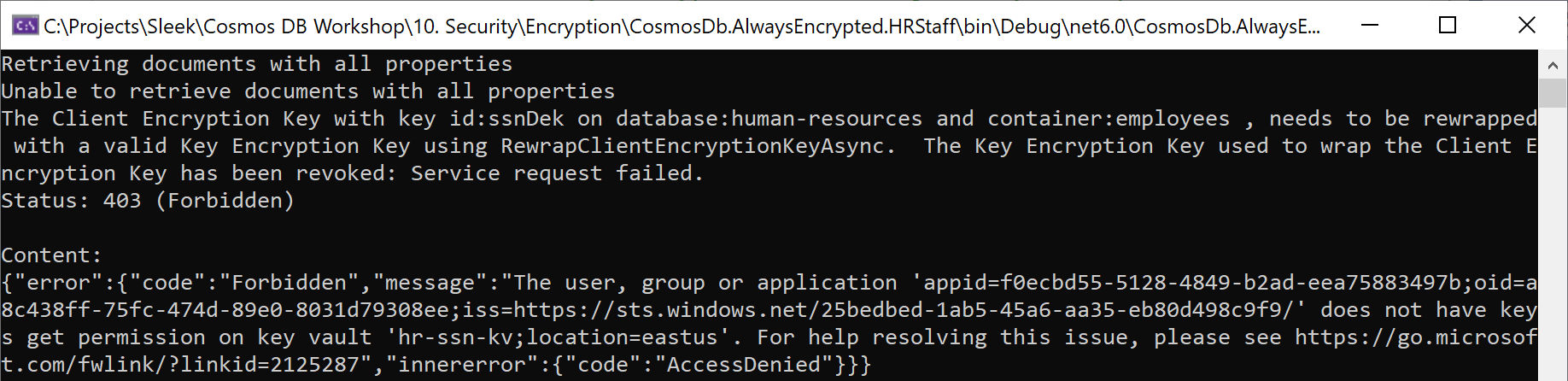
Sure enough, we get an exception for error code 403 (forbidden), for trying to access the ssn property, which the HR Staff application cannot decrypt.
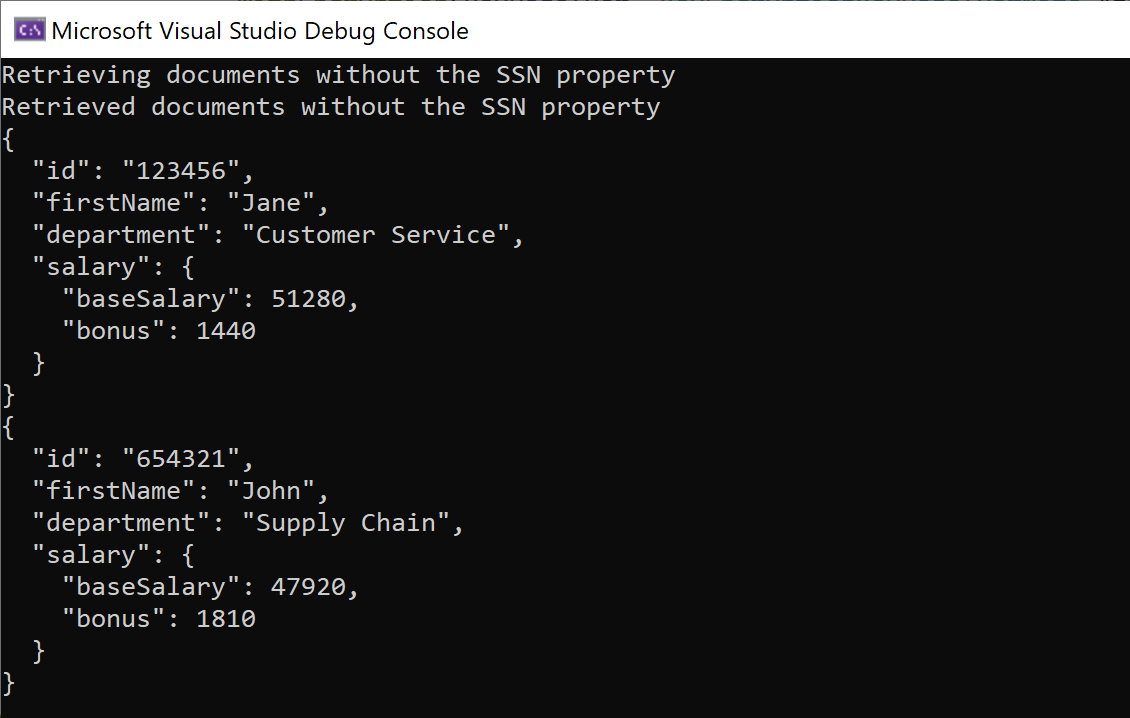
But this second query here doesn’t use SELECT *; instead, it lists all the desired properties that includes salary, but not ssn. This should work because the HR Staff application is authorized to decrypt salary, but not ssn:
// Succeeds because we are excluding the SSN property in the query projection
Console.WriteLine("Retrieving documents without the SSN property");
var results = await container.GetItemQueryIterator(
    "SELECT c.id, c.firstName, c.LastName, c.department, c.salary FROM c").ReadNextAsync();

Console.WriteLine("Retrieved documents without the SSN property");
foreach (var result in results)
{
    Console.WriteLine(JsonConvert.SerializeObject(result, Formatting.Indented));
}
And indeed, this query does work, showing that the HR Staff application can decrypt salary information, but not social security numbers:
And that’s client-side encryption (Always Encrypted) for Azure Cosmos DB in action!
Happy coding…



Leave a Reply