


In my previous post, I explained how server-side encryption works in Cosmos DB. You can rely on the server-side encryption that’s built into the service, and can also add another layer of encryption using customer-managed keys so that even Microsoft cannot decrypt your data without access to your own encryption keys.
Beyond server-side encryption, Cosmos DB supports client-side encryption – a feature that’s also known as Always Encrypted. In this post, I’ll introduce client-side encryption at a high level. My next two posts will then dig into the process of how to configure this feature, and use it in your .NET applications.
Because your data is always encrypted only on the server-side, enabling client-side encryption as well means that your data is truly always encrypted, even as it flows into and out of your client. Let’s start with a quick review of server-side encryption, and then see how client-side encryption works to achieve data that’s always encrypted.
Here’s an application that generates some data, and on the client-side that data is not encrypted:
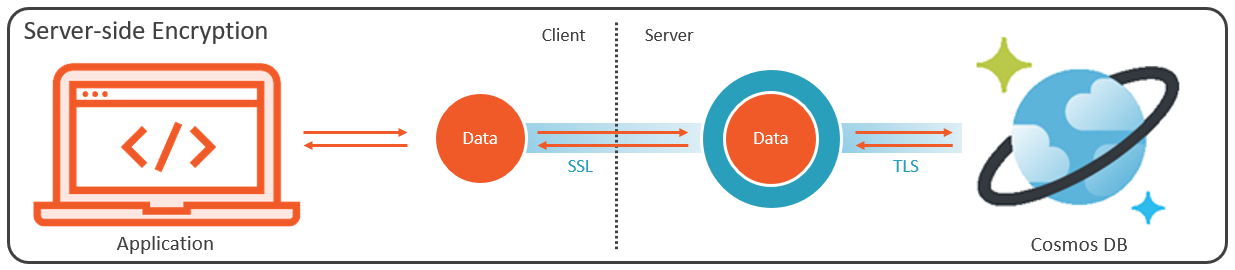
When the client sends the data across the internet to the server-side, it gets encrypted in-flight using SSL, and then once it crosses that boundary, Cosmos DB encrypts the data as I explained in my previous post – meaning that it gets encrypted using a Microsoft-managed encryption key, and then optionally double-encrypted using a customer-managed key. It then continues to make its way across the network, where it remains encrypted in flight until it reaches your Cosmos DB account, where it’s stored in the database, encrypted at rest. And the return trip is similar; the data is encrypted in flight on the way back, across the wire to the client, where it arrives decrypted for the client application to consume.
So you can see how – on the client side – the data is not encrypted. In fact, the client will never see the encrypted state of the data because the encryption is only happening on the server-side. So essentially every client is able to see all the data being returned from the server.
With client-side encryption, we rely on the .NET SDK to handle encryption from right inside your application, where the application itself requires access to customer-managed encryption keys that are never, ever, exposed to the Cosmos DB service.
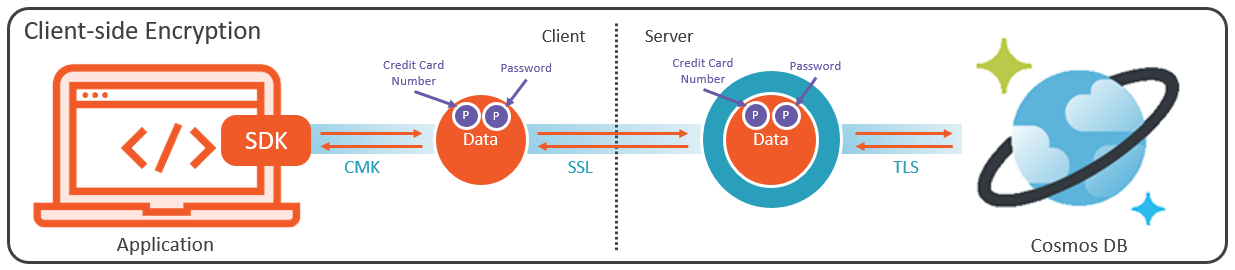
This process is completely transparent, so as soon as the application generates any data, the SDK immediately encrypts it before it ever gets to leave the application. Furthermore, this process is capable of encrypting only the most sensitive properties in your document, without necessarily having to encrypt the entire document. So properties like credit card numbers and passwords for example are encrypted on the client-side, from within your application, automatically by the SDK, right inside the document that your application is creating for the database.
The document then continues on to the server where now, it gets at least one additional layer of encryption using a Microsoft-managed key, and possibly one more layer of encryption if you’ve supplied a customer-managed key for server-side encryption. But even if you peel those encryption layers off on the server-side, the properties encrypted using your customer-managed key on the client side can never be revealed. So the data gets written to Cosmos DB, where ultimately, Cosmos DB – and that means Microsoft itself, is utterly incapable of reading those properties that were encrypted on the client. And that’s because the CMK used for client-side encryption is never revealed anywhere outside the client application.
Likewise, when returning data back to the client, those protected properties remain encrypted throughout the flight back to the application. Again, assuming the application has been granted access to the client-side customer-managed key, the SDK seamlessly decrypts the protected properties for the application.
Stay tuned for my next post, where I’ll show you how to configure client-side encryption for Cosmos DB using the Azure portal.



February 14, 2023 at 7:32 pm
[…] introduced client-side encryption (also known as Always Encrypted) in my previous post. In this post, I’ll walk you through the process of configuring this feature, so that your […]