
Data/View Separation in Word 2007 using Word XML Data Binding and OpenXML

The OpenXML file format used by Microsoft Office 2007 enables programmatic document manipulation without automating Word, so that Word does not need to be installed alongside your code, which is great for server applications. In this post, I’ll show you how to use OpenXML to implement bi-directional data binding between a Word document and XML data. This new feature in Word 2007 delivers the best data/view separation we’ve seen to date in Microsoft Office. And (for a LINQ junkie such as myself, anyway) the best part is that it works so nicely with LINQ to XML.

We’ll begin by creating a document with content controls. Then we’ll write a small amount of code to embed an XML file into the document and bind the content controls to various elements in the XML.

Before starting, you need to download the OpenXML SDK 2.0. Once the SDK is installed, you’ll have the assemblies you need to programmatically manipulate Office documents using the OpenXML API. You can download the SDK from here: http://www.microsoft.com/downloads/details.aspx?FamilyId=C6E744E5-36E9-45F5-8D8C-331DF206E0D0&displaylang=en

Create the Document

We’ll create a simple document with three content controls that will be bound to the following XML data:

<Customer>
  <Name>John Doe</Name>
  <Expiration>2/1/2010</Expiration>
  <AmountDue>$129.50</AmountDue>
</Customer>

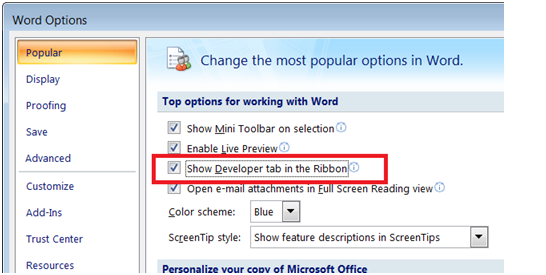
Start a new document in Word 2007, and type the word Dear followed by a space. We now want to inject our first content control for the customer name. You can add content controls to your document from the Developer tab on the ribbon, but since that tab is hidden by default, you’ll need to show it first. Click the Office button and choose Word Options. Then check the “Show Developer tab in the Ribbon” checkbox and click OK.
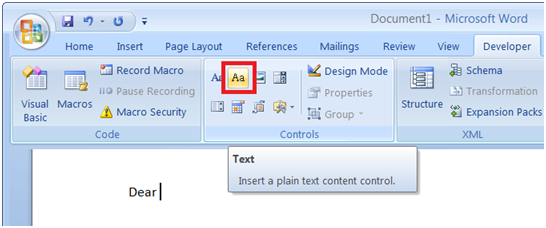
With the cursor still positioned after the text “Dear “, click in the Developer tab to insert a new Text content control:
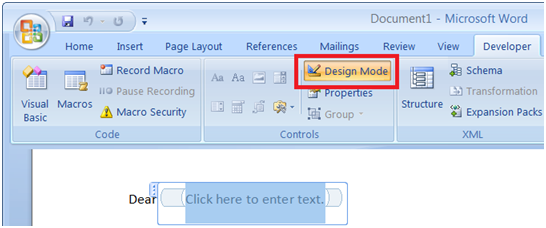
We’ll be assigning tag names to identify content controls for data binding in our code. To view the tag names in Word as we setup the content controls, click the Design Mode button in the Developer tab:
With the content control still selected, click Properties:
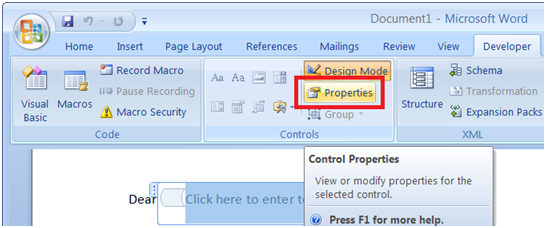
 

Set the Tag of the content control to Customer/Name, which is an XPath expression that refers to the <Name> element nested inside the <Customer> element of our XML data.
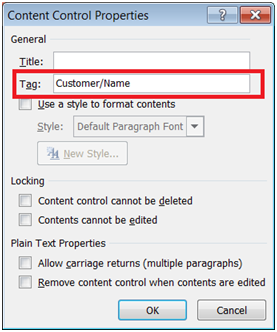
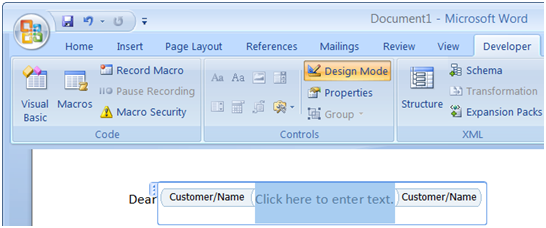
Click OK to close the dialog box. Notice how Word displays the tag name in the content control in Design Mode:
 

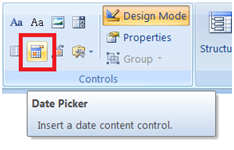
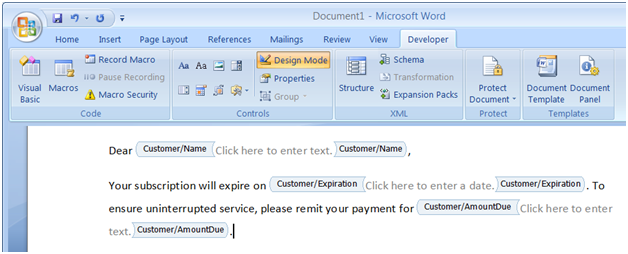
Continue adding text to the document, and insert two more content controls in a similar fashion for the expiration date and amount due fields. Use the same Text content control for the amount due field like we used for the customer name field, but use a Date Picker content control for the expiration date field:
After setting the tag names of the additional content controls to the appropriate XPath expressions (Customer/Expiration and Customer/AmountDue), your document should look something like this:
Turn off Design Mode to hide the tag names from the content controls:
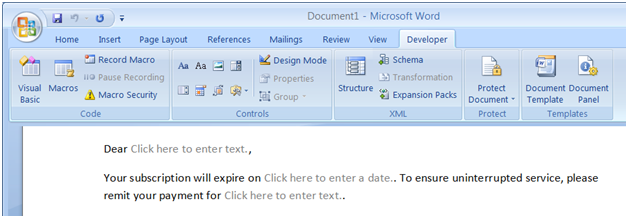
Save the document as CustomerReminder.docx. We have already established a separation of variable data and fixed document text, and could easily setup document protection at this point to allow manual data entry only for content controls. That’s cool all by itself, but we’re going to take this to the next level and implement automatic data binding between these content controls and a separate XML file. Although Word doesn’t care what values you assign to content control tags, we will now write code to find all tagged content controls, and treat those tags as XPath expressions that point to various XML elements in our XML data.

If you’re not already aware, all Office 2007 documents (including Word docx files) are actually compressed zip files (“packages”) that hold a collection of related XML “parts.” You can see this easily by simply appending .zip to the document filename and then opening it from Windows Explorer:
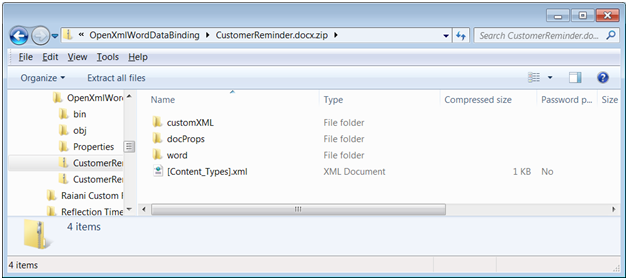
After examining the contents of the document package, rename the filename extension back to “.docx.”

Write the Code

Start Visual Studio and create a new Windows Forms project. Now set references to the two assemblies you’ll need for OpenXML programming: DocumentFormat.OpenXml and WindowsBase (these can be found on the .NET tab of the Add Reference dialog box). The first assembly exposes the OpenXML object model for document manipulation, and the second assembly provides the support for embedding and extracting parts to and from the document package:
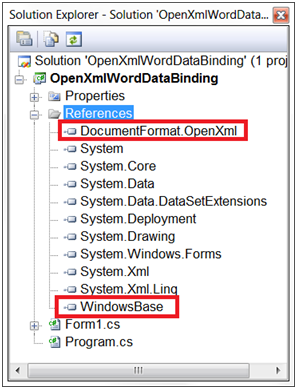
Drop a button onto the form named btnInit and supply code for its Click event handler. You’ll also need a few additional using statements for importing some namespaces. The complete code listing below shows the required using statements and the btnInit_Click event handler.

using System;
using System.IO;
using System.Linq;
using System.Windows.Forms;
using System.Xml.Linq;

using DocumentFormat.OpenXml.Packaging;
using DocumentFormat.OpenXml.Wordprocessing;

namespace OpenXmlWordDataBinding
{
  public partial class Form1 : Form
  {
    public Form1()
    {
      InitializeComponent();
    }

    private void btnInit_Click(object sender, EventArgs e)
    {
      var xml =
        new XElement("Customer",
          new XElement("Name", "John Doe"),
          new XElement("Expiration", "2/1/2010"),
          new XElement("AmountDue", "$129.50"));

      var docxFile = @"..\..\CustomerReminder.docx";

      using (var wpd = WordprocessingDocument.Open(docxFile, true))
      {
        var mainPart = wpd.MainDocumentPart;
        var xmlPart = mainPart.AddNewPart<CustomXmlPart>();
        using (Stream partStream = xmlPart.GetStream(FileMode.Create, FileAccess.Write))
        {
          using (StreamWriter outputStream = new StreamWriter(partStream))
          {
            outputStream.Write(xml);
          }
        }

        var taggedContentControls =
          from sdt in mainPart.Document.Descendants<SdtRun>()
          let sdtPr = sdt.GetFirstChild<SdtProperties>()
          let tag = (sdtPr == null ? null : sdtPr.GetFirstChild<Tag>())
          where tag != null
          select new
          {
            SdtProps = sdtPr,
            TagName = tag.GetAttribute("val", "http://schemas.openxmlformats.org/wordprocessingml/2006/main").Value
          };

        foreach (var taggedContentControl in taggedContentControls)
        {
          var binding = new DataBinding();
          binding.XPath = taggedContentControl.TagName;
          taggedContentControl.SdtProps.Append(binding);
        }

        mainPart.Document.Save();
      }
    }
  }
}

Let’s analyze this code piece by piece. First, we construct the XML data as a graph of XML objects using LINQ to XML functional construction:

var xml =
  new XElement("Customer",
    new XElement("Name", "John Doe"),
    new XElement("Expiration", "2/1/2010"),
    new XElement("AmountDue", "$129.50"));

Next, we invoke WordprocessingDocument.Open to open the Word document for write access using the OpenXML SDK. We do this inside of a using block to ensure proper disposal of unmanaged resources in the event that unhandled exception occurs inside of the block. The boolean true value specified for the second parameter means that we’re opening the document for write access:

var docxFile = @"..\..\CustomerReminder.docx";
using (var wpd = WordprocessingDocument.Open(docxFile, true))

Our code needs to do two things to the document at this point: add a new XML part containing the data to be bound, and assign the appropriate bindings to the content controls. Realize that this is code that will only execute once; subsequently, we’ll only be extracting/embedding the XML part from/to the document package using normal zip compression methods.

Add a New XML Part

With the document open and accessible to our code via the wpd variable, we invoke the AddNewPart<CustomXmlPart> method on wpd.MainDocumentPart to retrieve a new XML part in xmlPart. The new XML part exposes a GetStream method that enables us to stream content into and out of it. We take the generic Stream returned by GetStream and wrap a StreamWriter around it. The XML content can then be sent into the new XML part by writing to the StreamWriter. Again, we use nested using blocks on the stream objects to ensure proper cleanup if an exception occurs:

var mainPart = wpd.MainDocumentPart;
var xmlPart = mainPart.AddNewPart<CustomXmlPart>();
using (Stream partStream = xmlPart.GetStream(FileMode.Create, FileAccess.Write))
{
  using (StreamWriter outputStream = new StreamWriter(partStream))
  {
    outputStream.Write(xml);
  }
}

Now that the XML data is embedded as an XML part inside of the document’s .docx package, it’s available for data binding to content controls. The next and last thing we need to do is to programmatically find the tagged content controls inside the document and assign XML data bindings using the XPath expressions we defined in the content control tags.

Add the Data Bindings

Learning how to program Word with OpenXML is all about exploring the special XML markup language used by Word (a dialect known as WordprocessingML) and discovering the element and attribute names used to represent the document. You can view the document’s markup by examining the word/document.xml part inside of the .docx package. It can take quite a bit of detective work as you undergo the exploration and discovery process, but once you’re armed with the information you need, it’s very simple and straightforward to write a LINQ to XML query to get at what you need to in the document.

For example, here is how the customer name content control is expressed in WordprocessingML:

<w:sdt>
     <w:sdtPr>
           <w:tag w:val="Customer/Name"/>
           <w:id w:val="852281"/>
           <w:placeholder>
                <w:docPart w:val="DefaultPlaceholder_22675703"/>
           </w:placeholder>
           <w:showingPlcHdr/>
           <w:text/>
     </w:sdtPr>
     <w:sdtContent>
           <w:r w:rsidRPr="004E1B99">
                <w:rPr>
                      <w:rStyle w:val="PlaceholderText"/>
                </w:rPr>
                <w:t>Click here to enter text.</w:t>
           </w:r>
     </w:sdtContent>
</w:sdt>

An analysis of this XML shows how Word stores content controls inside a document. Specifically, Word creates a <w:sdt> element (structured document tag) and nests a <w:sdtPr> element (structured document tag properties) inside of it. And nested beneath that, Word stores the content control’s tag name in the w:val attribute of a <w:Tag> element. These element names can be referred to programmatically using the OpenXML API type names SdtRun, SdtProperties, and Tag, respectively. Thus, the following LINQ to XML query retrieves all tagged content controls in our document:

var taggedContentControls =
  from sdt in mainPart.Document.Descendants<SdtRun>()
  let sdtPr = sdt.GetFirstChild<SdtProperties>()
  let tag = (sdtPr == null ? null : sdtPr.GetFirstChild<Tag>())
  where tag != null
  select new
  {
     SdtProps = sdtPr,
     TagName = tag.GetAttribute("val", "http://schemas.openxmlformats.org/wordprocessingml/2006/main").Value
  };

In this query, the from clause uses the Descendants<SdtRun> method to retrieve all the <w:sdt> elements in the document. For each one, the first let clause uses the GetFirstChild<SdtProperties> method to retrieve the nested <w:sdtPr> element beneath it. The second let clause then performs a similar operation to retrieve the <w:tag> element nested beneath that. Since you cannot assume that every <w:sdt> element will always have a nested <w:sdtPr> element, the second let clause tests sdtPr for null before trying to invoke GetFirstChild<Tag> on it. The where clause ultimately filters our all content controls that have not been tagged.

The select clause constructs an anonymous type that returns two properties for each tagged content control. The first is the <w:sdtPr> which will be needed to reference the location at which we’ll inject the XML binding element. The second is the tag name extracted from the <w:tag> element’s <w:val> attribute (the full OpenXML namespace needs to be specified for w to retrieve the attribute value), which supplies the XPath expression for the binding. The LINQ query returns the results in a sequence that we then iterate to set the bindings:

foreach (var taggedContentControl in taggedContentControls)
{
  var binding = new DataBinding();
  binding.XPath = taggedContentControl.TagName;
  taggedContentControl.SdtProps.Append(binding);
}

mainPart.Document.Save();

For each tagged content control, we create a DataBinding object, set its XPath property to the tag name which is known provide an XPath expression referencing the desired XML data, and add the binding as a new element inside of the <w:sdtPr> element. Finally, invoking the Save method saves the modified document back to disk. If you examine the WordprocessingML now, you’ll see that our code added a <w:dataBinding> element with a w:xpath attribute to the <w:sdtPr> element in each content control. For example, the customer name content control now has the following element in its <w:sdtPr> section:

<w:dataBinding w:xpath="Customer/Name" />

Now let’s examine the docx package again. Add the .zip extension to the document filename and crack it open. Notice the new customXML folder that wasn’t there before. This is where all custom XML parts added to the document get stored.
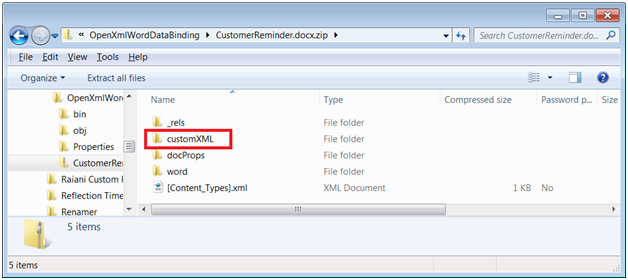
Double-click the customXML folder to reveal the item.xml file contained inside of it:
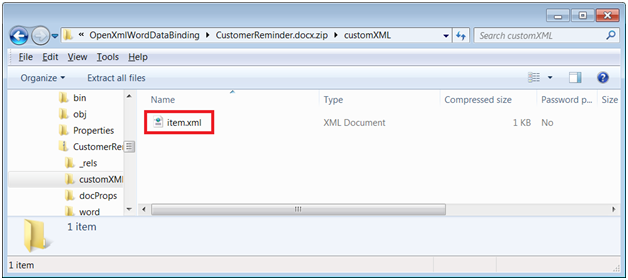
Now double-click item.xml to view it in IE:
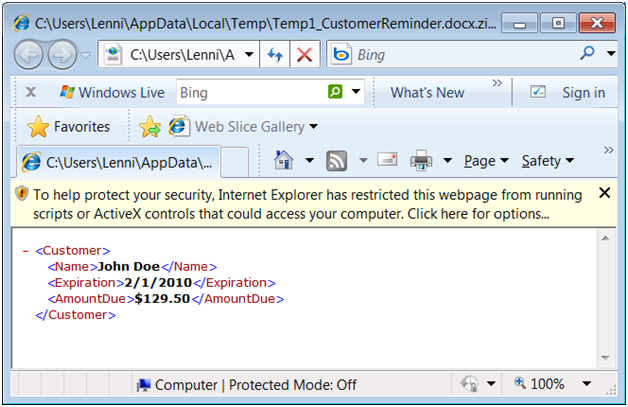
Look familiar? That’s the XML our code injected into the document as a custom XML part!

Now close the zip, rename the file back as .docx, and open it in Word:
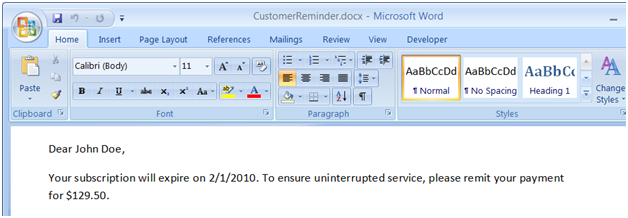
All the content placeholders have now been filled in with data from our XML file Does it get better than this? You bet! This thing works bi-directional. So go ahead and change John Doe to Sue Taylor:
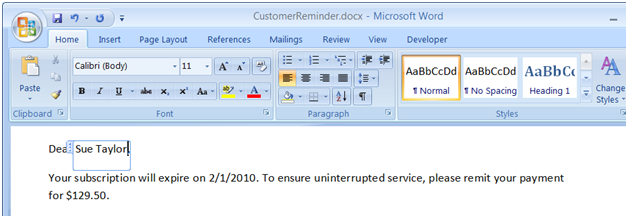
Now save the document, and rename it as .zip once again. This time, extract the item.xml file instead of opening it in IE, so that you can edit it in Notepad:
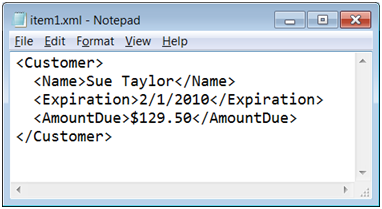
Beautiful. Word pushed the data from the modified content controls in the document back out to the XML file. Let’s now edit the XML; for example, we’ll change the expiration date:
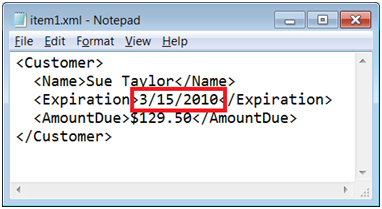
Save the XML file, push it back into the zip package, rename the zip package back to .docx, and re-open it in Word one last time:
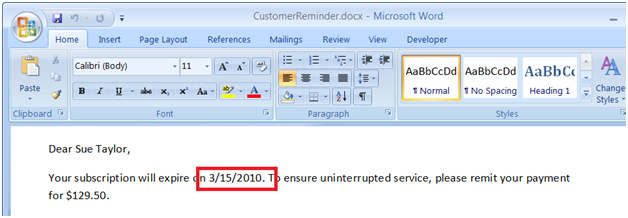
Now that’s what I call data/view separation! With XML data binding in Word, your application can easily view and change data elements without ever digging into the document text.

Of course, this only scratches the surface of what’s possible with OpenXML. It’s also worth mentioning that the same thing can be achieved using VSTO (Visual Studio Tools for Office) and the Word object model, but we’ll leave that for a future post. Until then, happy coding!
VSLive! Orlando Workshop/Session Materials

Well I’ve just gotten back from Orlando, after 4 days of VSLive!. The show was a great success, and there was a lot of incredible content across a wide variety of topics for developers.

I especially want to thank all the friendly folks that attended my full-day SQL Server 2008 workshop on Sunday; you guys made it a lot of fun! As promised, I am posting all the workshop materials (slides + code) for you to download. Even a full day wasn’t enough time to show off all the demos, so I definitely encourage everybody to explore all the code.

For those of you that missed the workshop but attended my Beyond Relational talk on Wednesday morning, the material for that session is a subset of the workshop materials, so you’ll find all the slides+code from the session in the workshop materials download.

Because WordPress doesn’t permit posting .zip files, I’ve pulled the old extension rename trick. So to download the zip, follow these steps:

  1. Click this link: 20091004 VSL_LobelOrlando_SQL08Workshop
  2. Choose to Save (not Open) and download the file
  3. Rename the file, changing the extension from .doc to .zip

Thanks again everybody, and happy coding!

Streaming Into LINQ to XML Using C# Custom Iterators and XmlReader

In this post, I’ll show you how to create LINQ to XML queries that don’t require you to first load and cache XML content into the in-memory LINQ to XML DOM (that is, without first populating an XDocument or XElement query source), but instead operate against an input stream implemented with a C# custom iterator method and an old-fashioned XmlReader object.

LINQ to XML

LINQ to XML, introduced with the .NET Framework 3.5, is a huge win for developers working with XML in any shape or form. Whether XML is being queried, parsed, or transformed, LINQ to XML can almost always be used as an easier alternative to previous technologies that are based on XML-specific languages (XPath, XQuery, XSLT).

At the center of the LINQ to XML stage lies a new DOM for caching XML data in memory. This object model, based on either a root XDocument object or independent XElement objects, represents a major improvement over the older XmlDocument-based DOM in numerous ways (details of which will serve as the topic for a future post). In terms of querying, the XDocument and XElement objects provide methods (such as Descendants) that expose collections of nodes which can be iterated by a LINQ to XML query.

Consuming Sequences with LINQ

A common misconception by many developers learning LINQ is that LINQ only consumes collections. That is not surprising, since one of first benefits developers come to understand is that LINQ can be used to easily query an input collection without coding a foreach loop. While this is certainly true, it’s a very limited view of what can really be accomplished with LINQ.

The broader view is that LINQ works against sequences, which are often — but certainly not always — collections. A sequence can be generated by any object that implements IEnumerable<T> or any method that returns an IEnumerable<T>. Such objects and methods provide iterators that LINQ calls to retrieve one element after another from the source sequence being queried. For a collection, the enumerator simply walks the elements of the collection and returns them one at a time. But you can create your own class that implements IEnumerable<T> or your own custom iterator method which serves as the enumerator that returns a sequence based on something other than a collection.

The point? LINQ is not limited to querying in-memory collections. It can be used to query any sequence, which is fed to the LINQ query by enumerator methods exposed by all classes that implement IEnumerable<T>. What this means is that you don’t necessarily need to load an entire XML document into an in-memory cache before you can query it using LINQ to XML. If you are querying very large documents in order to extract just a few elements of interest, you can achieve better performance by having your LINQ to XML query stream through the XML—without ever caching the XML in memory.

Querying Cached XML vs. Streamed XML

How do you write LINQ to XML queries that consume a read-only, forward-only input stream instead of a pre-populated in-memory cache? Easy. Refer to a custom iterator method instead of a pre-populated XDocument or XElement in the from clause of your query.

For example, consider the following query:

var xd = XDocument.Load("Customers.xml");
var domQuery =
  from c in xd.Descendants("Customer")
  where (string)c.Attribute("Country") == "UK"
  select c;

Now compare that query with this version:

var streamQuery =
  from c in StreamElements("Customers.xml", "Customer")
  where (string)c.Attribute("Country") == "UK"
  select c;

Both versions query over the same XML and produce the same output result (a sequence of customer nodes from the UK), but they consume their input sequences in completely differently ways. The first version first loads the XML content into an XDocument (in-memory cache), and then queries the collection of nodes returned by the Descendants method (all <Customer> nodes) for those in the UK. The larger the XML document being queried, the more memory is consumed by this approach. The second version queries directly against an input stream that feeds the XML content as a sequence using a custom iterator method named StreamElements. This version will consume no more memory for querying a huge XML file than it will for a tiny one. Here’s the implementation of the custom iterator method:

private static IEnumerable<XElement> StreamElements(
  string fileName,
  string elementName)
{
  using (var rdr = XmlReader.Create(fileName))
  {
    rdr.MoveToContent();
    while (rdr.Read())
    {
      if ((rdr.NodeType == XmlNodeType.Element) && (rdr.Name == elementName))
      {
        var e = XElement.ReadFrom(rdr) as XElement;
        yield return e;
      }
    }
    rdr.Close();
  }
}

Understanding C# Custom Iterators

By definition, this method is a custom iterator since it returns an IEnumerable<T> and has a yield return statement in it. By returning IEnumerable<XElement> specifically (just like the Descendants method in the cached DOM version of the query does), this custom iterator is suitable as the source for a LINQ to XML query. The implementation of this method is a beautiful demonstration of how seamlessly new technology (LINQ to XML) integrates with old technology (the XmlReader object has been around since .NET 1.0). Let’s examine the method piece by piece to understand exactly how it works.

When the query first begins to execute, and LINQ needs to start scanning the input sequence, the StreamElements custom iterator method is called with two parameters. The first parameter is the name of the input XML file (“Customers.xml”) and the second parameter is the element of interest to be queried (“Customer”, for each <Customer> node in the XML file).  The method then opens an “old-fashioned” XmlReader against the XML file and advances the stream to the beginning of its content by invoking MoveToContent. It then enters a loop that reads from the stream one element at a time. Each element is tested against the second parameter (“Customer”, in this example). Each matching element (which would be all <Customer> elements) is converted into in XElement object by invoking the static XElement.ReadFrom method against the reader. The XElement object representing the matching node is then yield returned to the LINQ query.

As the query continues to execute, and LINQ needs to continue scanning the input sequence for additional elements, the StreamElements custom iterator method continues execution right after the point at which it yield returned the previous element, rather than entering at the top of the method like an ordinary method would. In this manner, the input stream advances and returns one matching XElement after another while the LINQ query consumes that sequence and filters for UK to produce a new output sequence with the results. When the end of the input stream is reached, the reader’s Read method will return false, which will end the loop, close the reader, and finally exit the method. When the custom iterator method exits, that signals the LINQ query that there are no more input elements in the sequence and the query completes execution at that point.

One important point that may seem obvious but is worth calling out anyway, is that running streaming queries more than once results in reading through the entire stream each time. So to best apply this technique, you should try to extract everything you need from the XML content in one pass (that is, with one LINQ query). If it turns out that you need to query over the stream multiple times, you’ll need to reconsider matters to determine if you aren’t better off caching the XML content once and then querying over the in-memory cache multiple times.

Custom iterators are a very powerful C# language feature, not necessarily limited for use with LINQ. Streaming input into LINQ to XML queries as an alternative to using a cached input source is just one example, but there are numerous others ways to leverage custom iterators. To learn how they can be used with SQL Server 2008 Table-Valued Parameters to marshal an entire business object collection to a stored procedure in a single round-trip, view my earlier blog post that explains the details: SQL Server 2008 Table-Valued Parameters and C# Custom Iterators: A Match Made In Heaven!

Building Your First Windows Azure Cloud Application with Visual Studio 2008

In a previous post, I introduced the Azure Services Platform, and provided step-by-step procedures for getting started with Azure. It can take a bit of time downloading the tools and SDKs and redeeming invitation tokens, but once that’s all done, it’s remarkably simple and fast to build, debug, run, and deploy applications and services to the cloud. In this post, I’ll walk through the process for creating a simple cloud application with Visual Studio 2008.

You don’t need to sign up for anything or request any invitation tokens to walk through the steps in this post. Once you’ve installed the Windows Azure Tools for Microsoft Visual Studio July 2009 CTP and related hotfixes as described in my previous post, you’ll have the necessary templates and runtime components for creating and testing Windows Azure projects. (Of course, your Azure account and services must be set up to actually deploy and run in the cloud, which I’ll cover in a future post.)

Installing the Windows Azure Tools for Microsoft Visual Studio July 2009 CTP provides templates that simplify the process of developing a Windows Azure application. It also installs the Windows Azure SDK, which provides the cloud on your desktop. This means you can build applications on your local machine and debug them as if they were running in cloud. It does this by providing Development Fabric and Development Storage services that simulate the cloud environment on your local machine. When you’re ready, it then takes just a few clicks to deploy to the real cloud.

Let’s dive in!

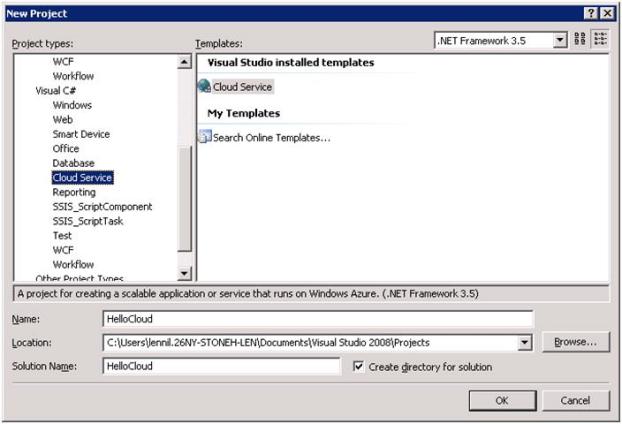
Start Visual Studio 2008, and begin a new project. Scroll to the new Cloud Service project type, select the Cloud Service template, and name the project HelloCloud.

NewCloudServiceProject

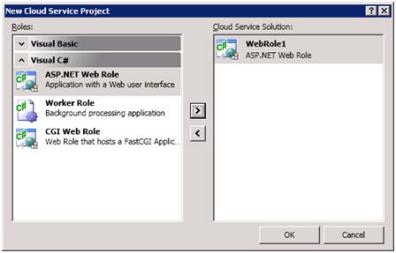
When you choose the Cloud Service template, you are creating at least two projects for your solution: the cloud service project itself, and any number of hosted role projects which Visual Studio prompts for with the New Cloud Service Project dialog. There are three types of role projects you can have, but the one we’re interested in is the ASP.NET Web Role. Add an ASP.NET Web Role to the solution from the Visual C# group and click OK.

AddWebRole

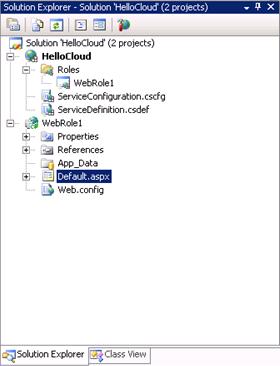
We now have two separate projects in our solution: a Cloud Service project named HelloCloud, and an ASP.NET Web Role project named WebRole1:

CloudSolution

The HelloCloud service project just holds configuration information for hosting one or more role projects in the cloud. Its Roles node in Solution Explorer presently indicates that it’s hosting one role, which is our WebRole1 ASP.NET Web Role. Additional roles can be added to the service, including ASP.NET Web Roles that host WCF services in the cloud, but we’ll cover that in a future post. Note also that it’s set as the solution’s startup project.

The project contains two XML files named ServiceDefinition.csdef and ServiceConfiguration.cscfg. Together, these two files define the roles hosted by the service. Again, for our first cloud application, they currently reflect the single ASP.NET Web Role named WebRole1:

ServiceDefinition.csdef

<?xml version="1.0"?>
<ServiceConfiguration serviceName="HelloCloud" xmlns="http://schemas.microsoft.com/ServiceHosting/2008/10/ServiceConfiguration">
<Role name="WebRole1">
<Instances count="1" />
<ConfigurationSettings />
</Role>
</ServiceConfiguration>

ServiceConfiguration.cscfg

<?xml version="1.0" encoding="utf-8"?>
<ServiceDefinition name="HelloCloud" xmlns="http://schemas.microsoft.com/ServiceHosting/2008/10/ServiceDefinition">
<WebRole name="WebRole1" enableNativeCodeExecution="false">
<InputEndpoints>
<!-- Must use port 80 for http and port 443 for https when running in the cloud -->
<InputEndpoint name="HttpIn" protocol="http" port="80" />
</InputEndpoints>
<ConfigurationSettings />
</WebRole>
</ServiceDefinition>

The second project, WebRole1, is nothing more than a conventional ASP.NET application that holds a reference to the Azure runtime assembly System.ServiceHosting.ServiceRuntime. From your perspective as an ASP.NET developer, an ASP.NET Web Role is an ASP.NET application, but one that can be hosted in the cloud. You can add any Web components to it that you would typically include in a Web application, including HTML pages, ASPX pages, ASMX or WCF services, images, media, etc.

For our exercise, we’ll just set the title text and add some HTML content in the Default.aspx page created by Visual Studio for the WebRole1 project.

<html xmlns="http://www.w3.org/1999/xhtml">

<head runat="server">
<title>Hello Windows Azure</title>
</head>
<body>
<form id="form1" runat="server">
<div>
<h1>Hello From The Cloud!</h1>
</div>
</form>
</body>
</html>

We’re ready to debug/run our application, but unlike debugging a conventional ASP.NET Web application:

  • The ASP.NET Web Role project is not the startup project; the Cloud Service project is
  • The ASP.NET Web Role project won’t run on the Development Server (aka Cassini) or IIS

So debugging cloud services locally means starting the Cloud Service project, which in turn will start all the role projects that the service project hosts. And instead of Cassini or IIS, the ASP.NET Web Role projects will be hosted by two special services that simulate the cloud on your local machine: Development Fabric and Development Storage. The Development Fabric service provides the Azure computational services used in the cloud, and the Development Storage service provides the Azure storage services used in the cloud.

There are still a few things you need to ensure before you hit F5:

  • You must have started Visual Studio as an administrator. If you haven’t, you’ll get an error message complaining that “The Development Fabric must be run elevated.” You’ll need to restart Visual Studio as an administrator and try again.
  • SQL Server Express Edition (2005 or 2008) must be running as the .\SQLEXPRESS instance, your Windows account must have a login in .\SQLEXPRESS, and must be a member of the sysadmin role. If SQL Express isn’t configured properly, you’ll get a permissions error.

Enough talk! Let’s walk through a few build-and-run cycles to get a sense of how these two services work. Go ahead and hit F5 and give it a run.

If this is the very first time you are building a cloud service, Visual Studio will prompt you to initialize the Development Storage service (this won’t happen again for future builds). Click Yes, and wait a few moments while Visual Studio sets up the SQL Express database.

Although it uses SQL Server Express Edition as its backing store, make sure you don’t confuse Development Storage with SQL Azure, which offers a full SQL Server relational database environment in the cloud. Rather, Development Storage uses the local SQL Express database to persist table (dictionary), BLOB (file system), and queue storage just as Windows Azure provides the very same Storage Services in the real cloud.

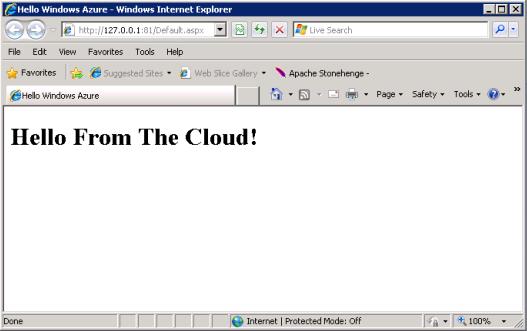
Once the build is complete, Internet Explorer should launch and display our Hello Cloud page.

HelloFromTheCloud

While this may seem awfully anti-climactic, realize that it’s supposed to. The whole idea is that the development experience for building cloud-based ASP.NET Web Role projects is no different than it is for building conventional on-premises ASP.NET projects. Our Hello Cloud application is actually running on the Development Fabric service, which emulates the real cloud fabric provided by Azure on your local machine.

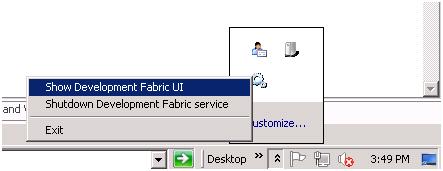
In the tray area, the Development Fabric service appears as a gears icon. Click on the gears icon to display the context menu:

DevelopmentFabricTray

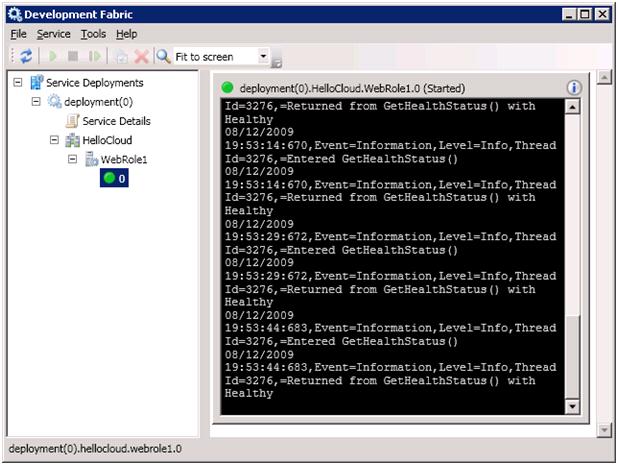
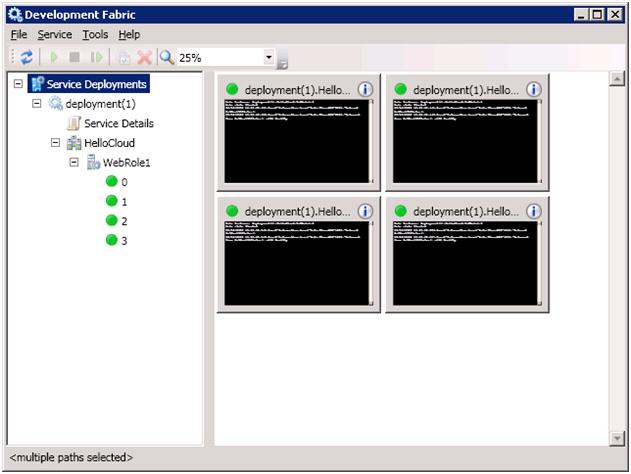
Click Show Development Fabric UI to display the service’s user interface. In the Service Deployments treeview on the left, drill down to the HelloCloud service. Beneath it, you’ll see the WebRole1 project is running. Expand the WebRole1 project to see the number of fabric instances that are running:

DevelopmentFabric1Instance

At present, and by default, only one instance is running. But you can scale out to increase the capacity of your application simply by changing one parameter in the ServiceDefinition.csdef file.

Close the browser and open ServiceDefinition.csdef in the HelloCloud service project. Change the value of the count attribute in the Instances tag from 1 to 4:

<Instances count="4" />

Now hit F5 again, and view the Development Fabric UI again. This time, it shows 4 instances hosting WebRole1:

DevelopmentFabric4Instances

As you can see, it’s easy to instantly increase the capacity of our applications and services. The experience would be the same in the cloud.

Congratulations! You’ve just built your first Windows Azure application. It may not do much, but it clearly demonstrates the transparency of the Azure runtime environment. From your perspective, it’s really no different than building conventional ASP.NET applications. The Visual Studio debugger attaches to the process being hosted by the Development Fabric service, giving you the same ability to set breakpoints, single-step, etc., that you are used to, so that you can be just as productive building cloud applications.

You won’t get full satisfaction, of course, until you deploy your application to the real cloud. To do that, get your Windows Azure account and invitation tokens set up (as described in my previous post), and stay tuned for a future post that walk you through the steps for Windows Azure deployment.

SQL Azure CTP1 Released

Get Introduced to The Cloud

Read my previous post for a .NET developer’s introduction to the Azure Services Platform, and the detailed steps to get up and running quickly with Azure.

Get Your SQL Azure Token

If you’ve been waiting for a SQL Azure token to test-drive Microsoft’s latest cloud-based incarnation of SQL Server, your wait will soon be over. Just this morning, Microsoft announced the release of SQL Azure CTP1, and over the next several weeks they should be sending invitation tokens to everyone that requested them (if you’ve not yet requested a SQL Azure token, go to http://msdn.microsoft.com/en-us/sqlserver/dataservices/default.aspx and click Register for the CTP).

Get the Azure Training Kit

Microsoft has also just released the August update to the Azure training kit that has a lot of new SQL Azure content in it. Be sure to download it here: http://www.microsoft.com/downloads/details.aspx?FamilyID=413E88F8-5966-4A83-B309-53B7B77EDF78.

Read the Documentation

The SQL Azure documentation, which was posted on MSDN on August 4, can be found here: http://msdn.microsoft.com/en-us/library/ee336279.aspx.

Get Your Head In The Clouds: Introducing the Azure Services Platform

Azure is coming, and it’s coming soon. If you’ve not yet gotten familiar with Azure (that is, the overall Azure Services Platform), you owe it to yourself to start learning about it now. Especially since it remains free until RTM in November. This post, and many that will follow, will help you get acquainted with Microsoft’s new cloud computing platform so that you can leverage your hard-earned .NET programming skills quickly and effectively as your applications and services begin moving to the cloud (and they will).

There are many pieces to Azure, and it would be overwhelming to dive into them all at once. So this post will just give the high-level overview, and future posts will target the individual components one at a time (so that you can chew and swallow like a normal person).

Cloud Computing: The Concept

Provisioning servers on your own is difficult. You need to first acquire and physically install the hardware. Then you need to get the necessary software license(s), install the OS, and deploy and configure your application. For medium-to-enterprise scale applications, you’ll also need to implement some form of load balancing and redundancy (mirroring, clustering, etc.) to ensure acceptable performance levels and continuous uptime in the event of unexpected hardware, software, or network failures. You’ll have to come up with a backup strategy and attend to it religiously as part of an overall disaster recovery plan that you’ll also need to establish. And once all of that is set up, you’ll need to maintain everything throughout the lifetime of your application. It’s no understatement to assert that moving to the cloud eliminates all of these burdens.

In short, the idea of applications and services running in “the cloud” means you’re dealing with intangible hardware resources. In our context, intangible translates to a maintenance-free runtime infrastructure. You sign up with a cloud hosting company for access, pay them for how much power your applications need (RAM, CPU, storage, scale-out load balancing, etc.), and let them worry about the rest.

Azure Virtualization and Fabric

Azure is Microsoft’s cloud computing offering. With Azure, your applications, services, and data reside in the Azure cloud. The Azure cloud is backed by large, geographically dispersed Microsoft data centers equipped with powerful servers, massive storage capacities, and very high redundancy to ensure continuous uptime.

However, this infrastructure is much more than just a mere Web hosting facility. Your cloud-based applications and services don’t actually run directly on these server machines. Instead, sophisticated virtualization technology manufactures a “fabric” that runs on top of all this physical hardware. Your “code in the cloud,” in turn, runs on that fabric. So scaling out during peak usage periods becomes a simple matter of changing a configuration setting that increases the number of instances running on the fabric to meet the higher demand. Similarly, when the busy season is over, it’s the same simple change to drop the instance count and scale back down. Azure manages the scaling by dynamically granting more or less hardware processing power to the fabric running the virtualized runtime environment. The process is virtually instantaneous.

Now consider the same scenario with conventional infrastructure. You’d need to provision servers, bring them online as participants in a load-balanced farm, and then take them offline to be decommissioned later when the extra capacity is no longer required. That requires a great deal of work and time — either for you directly, or for your hosting company — compared to tweaking some configuration with just a few mouse clicks,

The Azure Services Platform

The Azure Services Platform is the umbrella term for the comprehensive set of cloud-based hosting services and developer tools provided by Microsoft. It is still presently in beta, and is scheduled to RTM this November at the Microsoft PDC in Los Angeles. Even as it launches, Microsoft is busy expanding the platform with additional services for future releases.

Warning: During the past beta release cycles of Azure, there have been many confusing product brand name changes. Names used in this post (and any future posts between now and RTM) are based on the Azure July 2009 Community Technology Preview (CTP), and still remain subject to change.

At present, Azure is composed of the following components and services, each of which I’ll cover individually in future posts.

  • Windows Azure
    • Deploy, host, and manage applications and services in the cloud
    • Storage Services provides persisted storage for table (dictionary-style), BLOB, and queue data
  • SQL Azure
    • A SQL Server relational database in the cloud
    • With a few exceptions, supports the full SQL Server 2008 relational database feature set
  • Microsoft .NET Services
    • Service Bus enables easy bi-directional communication through firewall and NAT barriers via new WCF relay bindings
    • Access Control provides a claims-based security model that eliminates virtually all the gnarly security plumbing code typically used in business applications
  • Live Services
    • A set of user-centric services focused primarily on social applications and experiences
    • Mesh Services, Identity Services, Directory Services, User-Data Storage Services, Communication and Presence Services, Search Services, Geospatial Services

Getting Started with Azure

Ready to roll up your sleeves and dive in? Here’s a quick checklist for you to start building .NET applications for the Azure cloud using Visual Studio:

  • Ensure that your development environment meets the pre-requisites
    • Vista or Windows Server 2008 with the latest service packs, or Windows 7 (sorry, Windows XP not supported)
    • Visual Studio 2008 (or Visual Web Developer Express Edition) SP1
    • .NET Framework 3.5 SP1
    • SQL Server 2005/2008 Express Edition (workaround available for using non-Express editions)
  • Install Windows Azure Tools for Microsoft Visual Studio July 2009 CTP and related hotfixes
    • Download from http://msdn.microsoft.com/en-us/vstudio/cc972640.aspx
    • Installing the tools also installs the Windows Azure SDK
    • Provides Development Fabric and Development Storage services to simulate the cloud on your local development machine
    • Provides Visual Studio templates for quickly creating cloud-based ASP.NET applications and WCF services
  • Sign up for an Azure portal account using your Windows Live ID

Azure cloud services are free during the CTP, but Windows Azure and SQL Azure require invitation tokens that you need to request before you can use them. Also be aware that there could be a waiting period, if invitation requests during the CTP are in high demand, and that PDC attendees get higher priority in the queue. As of the July 2009 CTP, invitation tokens are no longer required for .NET Services or Live Services, and you can proceed directly to the Azure portal at http://windows.azure.com to start configuring those services.

The process to request invitation tokens for Windows Azure and SQL Azure can be a little confusing with the current CTP, so I’ve prepared the following step-by-step instructions for you:

  • To request an invitation token for Windows Azure:
    • Go to http://www.microsoft.com/azure/register.mspx and click Register for Azure Services
    • A new browser window will launch to the Microsft Connect Web site
    • If you’re not  currently logged in with your Windows Live ID, you’ll be prompted to do so now
    • You’ll then be taken through a short wizard-like registration process and asked to provide some profile information
    • You’ll then arrive at the Applying to the Azure Services Invitation Program page, which you need to complete and submit
    • Finally, you should receive a message that invitation tokens for both Windows Azure and SQL Azure will be sent to your Connect email account. Note that this is incorrect, and you will only be sent a Windows Azure token.
  • To request an invitation token for SQL Azure, you need to join the mailing list on the SQL Azure Dev Center:
    • Go to http://msdn.microsoft.com/en-us/sqlserver/dataservices/default.aspx
    • Click Register for the CTP
    • If you’re not  currently logged in with your Windows Live ID, you’ll be prompted to do so now
    • You’ll then arrive at the mailing list signup page, which you need to complete and submit
    • Finally, you should receive a message that you will be notified when your SQL Azure access becomes available
    • Note: SQL Azure tokens are limited; you may have to be patient to receive one during the CTP

Once you receive your invitation tokens, you can log in to the Azure portal at http://windows.azure.com and redeem them.

You don’t need to wait for your Windows Azure invitation code to begin building cloud applications and services with Visual Studio. Once you’ve installed the Windows Azure Tools for Microsoft Visual Studio July 2009 CTP and related hotfixes as described earlier, you’ll have the necessary templates and runtime components for creating and testing Windows Azure projects. Using the Development Fabric service that emulates the cloud on your desktop, you can run and debug Windows Azure projects locally (of course, you won’t be able to deploy them to the real cloud until you receive and redeem your Windows Azure invitation token). It’s easy to do, and in an upcoming post, I’ll show you how.

Posted in Windows Azure. Tags: . 2 Comments »

Optimizing Factory Methods with Static Delegate Arrays

In my last post, I explained the benefits of using factory classes to achieve polymorphism in your business applications, and demonstrated how implementing such an architecture greatly improves the design and maintainability of your code. In this post (part 2 if you will) I’ll first quickly review the benefits of the factory pattern, and then demonstrate how to refactor the typical switch/case factory implementation to achieve ultra-high performance using a static array of delegates.

Here is the TenderType enum and TenderFactory code from the last post:

public enum TenderType
{
  Cash,
  DebitCard,
  CreditCard,
   //
   // more tender types
   //
}

public static class TenderFactory
{
  public static ITender CreateTender(TenderType tenderType)
  {
    switch (tenderType)
    {
      case TenderType.Cash:
        return new CashTender();

      case TenderType.DebitCard:
        return new DebitCardTender();

      case TenderType.CreditCard:
        return new CreditCardTender();
       //
       // more case statements here
       //
      default:
        throw new Exception("Unsupported tender: " + (int)tenderType);
    }
  }
}

In this example, we have a factory method that accepts a TenderType enum and uses it to create a concrete tender object corresponding to that enum. All the different tender objects implement the ITender interface, so that’s the type returned by the factory. Because the different tender behaviors are encapsulated in the set of concrete tender classes, client code can simply call this factory method to retrieve an ITender object for any tender type and work with that object without knowing the actual type. That is, you can write polymorphic code that doesn’t need to be maintained as concrete type behaviors change or new concrete types are added in the future.

It’s easy to recognize when you should be using this pattern in your own applications. When you find yourself coding the same switch/case ladder repeatedly, that’s a sure indication that your architecture can be improved significantly by using factories and polymorphism. It’s important to sensitize yourself so that you detect this condition early in your development efforts and apply the factory pattern then. It will be a much greater burden to refactor your code to use the factory pattern later on, once you have allowed a proliferation of switch/case statements to spread throughout your code.

So now we’ve got a single switch/case ladder in a centralized factory method, which eliminates the multitudes of duplicate switch/case ladders that would have otherwise been scattered throughout our application’s code. A huge improvement, to be certain, but can we improve it even more? You bet!

The Need For Speed

Because object instantiation is a very common occurrence, factory methods in general need to perform well. A performance bottleneck in the factory will quickly translate to a serious application-wide problem. If you’re dealing with a small set of concrete types (like our tenders example), and/or your factory code is running on a desktop or other single-user environment, the switch/case implementation of the factory method shown above is probably perfectly suitable and won’t require optimization.

In the real world, however, a factory method frequently supports dozens or even hundreds of different concrete types, which means coding a very long switch/case ladder in that method. Next consider the fact that the switch/case ladder is evaluated sequentially at runtime, top-to-bottom. This means that a matching case statement further down the ladder takes longer to reach than one further up the ladder. Again, for a handful of types in a single-user environment, that differential is imperceptible. But if your factory code supports many types through a long switch/case ladder, and runs on a multi-user application server that is servicing many concurrent client requests for new object instances in high demand, then it becomes critical that your factory code executes as quickly as possible.

A Golden Rule of Optimization: Let The Compiler Do The Work

The following alternative implementation is vastly superior to the switch/case version:

public static class TenderFactory
{
  private delegate ITender CreateTenderMethod();

  // Important: The order of delegates in this static array must match the
  //  order that the TenderType enums are defined.
  private static CreateTenderMethod[] CreateTenderMethods = new CreateTenderMethod[]
  {
    delegate() { return new CashTender(); },
    delegate() { return new DebitCardTender(); },
    delegate() { return new CreditCardTender(); },
     //
     // more delegates here
     //
  };

  public static ITender CreateTender(TenderType tenderType)
  {
    var tender = CreateTenderMethods[(int)tenderType].Invoke();
    return tender;
  }
}

This factory code takes a novel approach. Let’s dissect it.

At the top of the class we define a delegate named CreateTenderMethod which takes no parameters and returns an ITender object. We then declare a static array of CreateTenderMethod delegates, and populate it with anonymous methods that return for each concrete tender type. Stop and think about what this means. The static array is allocated in memory and populated with method pointers for each tender type by the compiler at compile-time. So when this assembly loads into memory, the static array just rolls right into the address space with all the elements already mapped to the methods returning the concrete types. There is no runtime hit whatsoever for dynamically allocating storage space for the array from heap and populating it with delegate instances. The work was already done by the compiler. Having the compiler do work at compile time to avoid having to do the work at runtime is one of the golden rules of optimization.

The CreateTender method itself is now ridiculously simple. It takes the incoming enum and converts it to an integer which it uses as an index into the static array. That instantaneously retrieves the correct delegate which points to the method that will return the concrete tender type specified by the enum. In an array of 250 elements, it won’t take any longer to retrieve the delegate for the 250th element than it will for the first. The Invoke method on the delegate actually runs the method and returns the correct ITender derivative to the requesting client. The only important thing to remember when using this technique, which you may have already realized on your own, is that the order of delegates in the array must match the order that the enums are defined (as mentioned in the code comments). A mismatch will obviously manifest itself as a serious runtime error.

What’s really nice here is that anonymous methods added in C# 2.0 greatly reduce the amount of code this solution requires, compared to what was required before anonymous methods. Back then, you’d need to explicitly create one-line methods for each concrete tender type, and then reference each of those one-line methods from an explicit delegate constructor in the static array. So this implementation is now not only significantly faster than the typical switch/case approach, it’s also just as easy to implement and maintain. Don’t you just love it when there are no downsides?

Leveraging Polymorphism with Factory Classes

In this post, I’ll explain the benefits of using the factory pattern, and show you how to code a typical factory implementation to achieve polymorphism in your .NET applications. In my next post, I’ll show you how to optimize the factory method for ultra-high performance by using a static array of delegates.

Working with Different Types

Let’s use a typical POS (Point Of Sale) scenario to illustrate the factory pattern. POS applications run on checkout counters in retail stores, where the customer can pay with a variety of tender types, such as cash, credit, debit, voucher, etc. Each of these types exhibit different behaviors; for example, paying with cash pops open the cash drawer, paying by debit card requires a PIN, paying by credit card requires a signature, etc.

Without using a factory pattern to manage the different tender types, code to determine if a customer signature is required on checkout for a given tender type might look like this:

bool isSignatureRequired;
switch (tenderType)
{
  case TenderType.Cash:
    isSignatureRequired = false;
    break;


  case TenderType.DebitCard:
    isSignatureRequired = false;
    break;


  case TenderType.CreditCard:
    isSignatureRequired = true;   // credit cards require signature
    break;

   //
   // more case statements here
   //

  default:
    throw new Exception("Unsupported tender: " + (int)tenderType);
}

Similarly, to determine if a PIN is required for any given tender type:

bool isPinRequired;
switch (tenderType)
{
  case TenderType.Cash:
    isPinRequired = false;
    break;


  case TenderType.DebitCard:
    isPinRequired = true;   // debit cards require PIN
    break;


  case TenderType.CreditCard:
    isPinRequired = false;
    break;

   //
   // more case statements here
   //

  default:
    throw new Exception("Unsupported tender: " + (int)tenderType);
}

With this approach, the same switch/case “ladder” will appear numerous times scattered throughout your application, each one dealing with a different aspect of each possible tender type. In short order, maintenance will become a nightmare. Changing the behavior of any type means hunting down all the pertinent switch/case blocks and modifying them. Creating a new type means adding a new case to many existing switch/case blocks—wherever they are (good luck finding them all). It’s nearly impossible to gain a clear picture of how the tender types compare to one another, because bits of information about each tender are fragmented in switch/case blocks across the application’s codebase.

Creating a Factory

The factory pattern solves this problem by eliminating all these switch/case blocks from your application, and consolidating the logic for each type in its own class instead. All the classes for each type implement the same interface, so that you can work with an instance of any type without knowing or caring what the concrete type is, and get the information you need.

With a factory pattern in place, you won’t have to search for or modify one line of code in your core application logic when the behavior of an existing tender changes or a tender type is supported in the future. This represents a huge improvement over the scattered switch/case approach.

Here are the steps to implement the pattern:

1) Create the ITender interface:

With this interface, we have defined certain things that we know about every tender type, such as IsSignatureRequired, IsPinRequired, AllowCashBack, etc.

public interface ITender
{
  bool IsSignatureRequired { get; }
  bool IsPinRequired { get; }
  bool AllowCashBack { get; }
  bool PopOpenCashDrawer { get; }
   //
   // more members
   //
}

2) Define enums for each ITender derivative: 

public enum TenderType
{
  Cash,
  DebitCard,
  CreditCard,
   //
   // more tender types
   //
}

3) Create concrete ITender classes. Here are three concrete classes that implement ITender:

public class CashTender : ITender
{
  bool ITender.IsSignatureRequired { get { return false; } }
  bool ITender.IsPinRequired       { get { return false; } }
  bool ITender.AllowCashBack       { get { return false; } }
  bool ITender.PopOpenCashDrawer   { get { return true; } }
}

public class DebitCardTender : ITender
{
  bool ITender.IsSignatureRequired { get { return false; } }
  bool ITender.IsPinRequired       { get { return true; } }
  bool ITender.AllowCashBack       { get { return true; } }
  bool ITender.PopOpenCashDrawer   { get { return false; } }
}

public class CreditCardTender : ITender
{
  bool ITender.IsSignatureRequired { get { return true; } }
  bool ITender.IsPinRequired       { get { return false; } }
  bool ITender.AllowCashBack       { get { return false; } }
  bool ITender.PopOpenCashDrawer   { get { return false; } }
}

4) Create the factory class:

public static class TenderFactory
{
  public static ITender CreateTender(TenderType tenderType)
  {
    switch (tenderType)
    {
      case TenderType.Cash:
        return new CashTender();


      case TenderType.DebitCard:
        return new DebitCardTender();


      case TenderType.CreditCard:
        return new CreditCardTender();


       //
       // more case statements here
       //

      default:
        throw new Exception("Unsupported tender: " + (int)tenderType);
    }
  }
}

With these elements in place, you can handle any ITender derivative throughout your application easily and elegantly. Given an enum for any particular tender type, a single call to the CreateTender factory method will return a new instance of the correct concrete ITender object. You can then work with the properties and methods of the returned instance and get the results expected for the specific tender type, without needing to know the specific tender type or testing for different tender types. This is the essence of polymorphism.

For example, to determine if a signature is required, it’s as simple as:

ITender tender = TenderFactory.CreateTender(tenderType);
bool isSignatureRequired = tender.IsSignatureRequired;

Unlike the code at the top of the post that retrieved this information without using the factory pattern, this code will never change, even as new tenders are added in the future. Adding support for a new tender (for example, food stamps) now involves only adding a new enum, creating a new concrete class that implements all the ITender members for the new tender type, and adding a single case statement to the factory method’s switch/case block. Doing so allows you to instantly plug in new tender types without touching one line of code throughout the body of your core application logic. The code above requires no modifications to determine if a signature is required for a newly added tender.

Enhancing and Optimizing the Factory Method

So now your application calls a method in the factory class to “new up” an ITender instance rather than explicitly instantiating a new ITender object through one of its constructors. You can enhance this pattern by encapsulating all the concrete classes in a separate assembly and scoping their constructors as internal (Friend, in VB) so that clients cannot circumvent the factory method and are instead forced to create new ITender instances by calling the factory method.

Another logical next step would be to create an abstract base class named TenderBase which would house common functionality that all tender types require. TenderBase would implement ITender, and all the concrete tender classes would inherit TenderBase instead of directly implementing ITender (though they will still implement ITender implicitly of course, since TenderBase implements ITender).

It’s important to ensure that your factory methods execute as quickly as possible, especially in scenarios where there is a high-volume demand to create new objects. In my next post, I’ll show you an improved version of the factory method that significantly out-performs the switch/case approach shown here (especially when dealing very a great many entity types), by replacing the switch/case logic with a static array of delegates.

Rethinking the Dynamic SQL vs. Stored Procedure Debate with LINQ

Dynamic SQL is evil, right? We should only be using stored procedures to access our tables, right? That will protect us from SQL injection attacks and boost performance because stored procedures are parameterized and compiled, right?

Well think again! The landscape of this debate has changed dramatically, especially with the advent of Language-Integrated Query (LINQ) technologies against relational databases, such as LINQ to SQL (L2S) against SQL Server and LINQ to Entities (L2E) against the Entity Framework’s (EF) Entity Data Model (EDM) over any RDBMS with an ADO.NET provider for EF. This is because, despite the fact that both these ORM technologies support the use of stored procedures, their real intended use is to generate dynamic SQL.

For simplicity, the examples below only use LINQ to SQL, but the same principles apply to LINQ to Entities.

Comparing Dynamic SQL and Stored Procedures in LINQ Queries

Let’s compare the behavior of LINQ queries that generate dynamic SQL with LINQ queries that invoke stored procedures. In our example, we’ll use the Sales.Currency table in the AdventureWorks 2008 database that contains a complete list of global currency and exchange rates. The following L2S query generates dynamic SQL to select just those currencies with codes beginning with the letter B:

// LINQ to SQL query using dynamic SQL
var q =
    from currency in ctx.Currencies
    where currency.CurrencyCode.StartsWith("B")
    select currency;

The ctx variable is the L2S DataContext, and its Currencies property is a collection mapped to the Sales.Currency table in the database (it’s common practice to singularize table names and pluralize collection names).

Modifying this query to use a stored procedure is easy. Assuming we create a stored procedure named SelectCurrencies that executes SELECT * FROM Sales.Currency and then import that stored procedure into either our L2S (.dbml) or EF (.edmx) model, the LINQ query requires only a slight modification to have it call the stored procedure instead of generating dynamic SQL against the underlying table:

// LINQ to SQL using a stored procedure
var q =
    from currency in ctx.SelectCurrencies()
    where currency.CurrencyCode.StartsWith("B")
    select currency;

The only change made to the query is the substitution of the SelectCurrencies method (which is a function that maps to the stored procedure we imported into the data model) for the Currencies property (which is a collection that maps directly to the underlying Sales.Currency table). 

Examining the Generated SQL

There is a major performance problem with this new version of the query, however, which may not be immediately apparent. To understand, take a look at the generated SQL for both queries:

Query 1 (dynamic SQL):

SELECT [t0].[CurrencyCode], [t0].[Name], [t0].[ModifiedDate]
FROM [Sales].[Currency] AS [t0]
WHERE ([t0].[CurrencyCode] LIKE @p0)
-- @p0: Input NVarChar (Size = 2; Prec = 0; Scale = 0) [B%]

Query 2 (stored procedure):

EXEC @RETURN_VALUE = [dbo].[SelectCurrencies]
-- @RETURN_VALUE: Output Int (Size = 0; Prec = 0; Scale = 0) [Null]

Now the problem should be blatantly obvious. The first query executes the filter condition for currencies with codes that start with the letter B in the WHERE clause of the SELECT statement on the database server (by setting parameter @p0 to ‘B%’ and testing with LIKE in the WHERE clause). Only results of interest are returned to the client across the network. The second query executes the SelectCurrencies stored procedure which returns the entire table to the client across the network. Only then does it get filtered by the where clause of the LINQ query to reduce that resultset and obtain only currencies with codes that start with B, while all the other (“non-B”) rows that just needlessly traversed the network from SQL Server are immediately discarded. That clearly amounts to wasted processing, and is a serious performance penalty for the use of stored procedures with LINQ.

Of course, one obvious solution to this problem is to modify the SelectCurrencies stored procedure to accept a @CurrencyCodeFilter parameter and change its SELECT statement to test against that parameter as follows: SELECT * FROM Sales.Currency WHERE CurrencyCode LIKE @CurrencyCodeFilter. That will ensure that only the rows of interest are returned from the server, just like the dynamic SQL version behaves. The LINQ query would then look like this:

// LINQ to SQL using a parameterized stored procedure
var q =
    from currency in ctx.SelectCurrencies("B%")
    select currency;

Performance problem solved, but this solution definitely begs the question “where’s the WHERE?” – in the stored procedure, or in the LINQ query? It needs to be in the stored procedure to prevent unneeded rows from being returned across the network, but then it’s not in the LINQ query any more. So LINQ queries that you need optimized for stored procedures won’t have a where clause in them, and in my humble opinion, that seriously undermines the effectiveness and expressiveness of LINQ queries because the query is now far less “language-integrated”.

Revisiting the Big Debate

Clearly LINQ to SQL and Entity Framework want us to embrace hitting the database server with dynamic SQL, but many database professionals live by the creed “dynamic SQL is the devil, and thou shalt only use stored procedures.” So let’s re-visit the heated “dynamic SQL vs. stored procedure” debate.

Proponents of stored procedures cite the following primary reasons against using dynamic SQL:

1) Security: Your application becomes vulnerable to SQL injection attacks.

2) Performance: Dynamic SQL doesn’t get compiled like stored procedures do, so it’s slower.

3) Maintainability: Spaghetti code results, as server-side T-SQL code is then tightly coupled and interwoven with client-side C# or VB .NET.

Let’s address these concerns:

1) Security: Vulnerability to SQL injection attacks results from building T-SQL statements using string concatenation. Even stored procedures are vulnerable in this respect, if they generate dynamic SQL by concatenating strings. The primary line of defense against SQL injection attacks it to parameterize the query, which is easily done with dynamic SQL. That is, instead of concatenating strings to build the T-SQL, compose a single string that has one or more parameters, and then populate the Parameters collection of the SqlCommand object with the parameter values (this is how the L2S query above prepared the command for SQL Server, as evidenced by the output of the generated T-SQL that uses the parameter @p0 in the WHERE clause).

2) Performance: You’re a little behind the times on this one. It’s true that stored procedures would get partially compiled to speed multiple executions in SQL Server versions 6.5 (released in 1996) and earlier. But as of SQL Server 7.0 (released in 1999), that is no longer the case. Instead, SQL Server 7.0 (and later) compiles and caches the query execution plan to speed multiple executions of the same query (where only parameter values vary), and that’s true whether executing a stored procedure or a SQL statement built with dynamic SQL.

3) Maintainability: This remains a concern if you are embedding T-SQL directly in your .NET code. But with LINQ, that’s not the case because you’re only composing a LINQ query (designed to be part of your .NET code); the translation to T-SQL occurs on the fly at runtime when you execute your application.

Making a Good Compromise

These facts should change your perspective somewhat. But if you’re a die-hard stored procedure proponent that finds it hard to change your ways (like me), consider this compromise: Allow dynamic SQL for SELECT only, but continue using stored procedures for INSERT, UPDATE, and DELETE (which can be imported into your data model just like a SELECT stored procedure can). This is a good strategy because LINQ queries only generate SELECT statements to retrieve data. They can’t update data. Only the SubmitChanges method on the L2S DataContext (or the SaveChanges method on the L2E ObjectContext) generates commands for updating data, with no downside to using stored procedures over dynamic SQL like there is for SELECT.

So you can (and should) stick to using stored procedures for INSERT, UPDATE, and DELETE operations, while denying direct access to the underlying tables (except for SELECT). Doing so allows you to continue using stored procedures to perform additional validation that cannot be bypassed by circumventing the application layer and communicating directly with the database server.

SQL Server 2008 Table-Valued Parameters and C# Custom Iterators: A Match Made In Heaven!

The new Table-Valued Parameter (TVP) feature is perhaps the most significant T-SQL enhancement in SQL Server 2008. Many people have already discovered how to use this feature for passing entire sets of rows with a typed schema definition along from one stored procedure to another on the server. This is something that has not been previously possible using either table variables or temp tables, although temp tables can of course be shared between multiple stored procedures executing on the same connection. Conveniently, TVPs can be passed freely between stored procedures and user-defined functions (UDFs) on the server.

A less widely-known capability of TVPs—yet arguably their most compelling facet—is the ability to marshal an entire set of rows across the network, from your ADO.NET client to your SQL Server 2008 database, with a single stored procedure call (only one round-trip) that accepts a single table-valued parameter. Developers have resorted to a variety of clever hacks over the years to reduce multiple round-trips for processing multiple rows—including XML, delimited text, or even (gasp) accepting hundreds (up to 2100!) of parameters. But special logic then needs to be implemented for packaging and unpackaging the parameter values on both sides of the wire. Worse, the code to implement that logic is often gnarly, and tends to impair developer productivity. None of those techniques even come close to the elegance and simplicity of using TVPs as a native solution to this problem.

I won’t cover the basics of TVPs, since many folks know them already and there are numerous blog posts already on the Web that explain the basics (not to mention Chapter 2 in my book) What I will show is how to implement TVPs in ADO.NET client code for passing an entire DataTable object (all its rows and columns) to SQL Server with one stored procedure call.

If you’re a business-object person and not a DataSet/DataTable person, I’ll also show you how to do the same thing with an entire business object collection using C# custom iterators. There are few places (if any) other than this blog post that show the necessary steps to implement TVPs against business object collections (it’s not even covered in my book!). So let’s get started.

Preparing the SQL Server Database

Before diving into the C# code, we need to set up our database for a simple Order Entry scenario. That means creating an Order table and a related OrderDetail table. We’ll also need an OrderUdt and OrderDetailUdt user-defined table type (UDTT) to base our TVPs on, and a single InsertOrders stored procedure that accepts header and detail TVPs containing typed rows to be bulk inserted into the underlying tables:

CREATE TABLE [Order](
 OrderId int NOT NULL,
 CustomerId int NOT NULL,
 OrderedAt date NOT NULL,
 CreatedAt datetime2(0) NOT NULL,
  CONSTRAINT PK_Order PRIMARY KEY CLUSTERED (OrderId ASC))
GO

CREATE TABLE [OrderDetail](
 OrderId int NOT NULL,
 LineNumber int NOT NULL,
 ProductId int NOT NULL,
 Quantity int NOT NULL,
 Price money NOT NULL,
 CreatedAt datetime2(0) NOT NULL,
  CONSTRAINT PK_OrderDetail PRIMARY KEY CLUSTERED (OrderId ASC, LineNumber ASC))
GO

CREATE TYPE OrderUdt AS TABLE(
 OrderId int,
 CustomerId int,
 OrderedAt date)
GO

CREATE TYPE OrderDetailUdt AS TABLE(
 OrderId int,
 LineNumber int,
 ProductId int,
 Quantity int,
 Price money)
GO

CREATE PROCEDURE InsertOrders(
 @OrderHeaders AS OrderUdt READONLY,
 @OrderDetails AS OrderDetailUdt READONLY)
AS
 BEGIN

    -- Bulk insert order header rows from TVP
    INSERT INTO [Order]
     SELECT *, SYSDATETIME() FROM @OrderHeaders

    -- Bulk insert order detail rows from TVP
    INSERT INTO [OrderDetail]
     SELECT *, SYSDATETIME() FROM @OrderDetails

 END
GO

Notice how the schemas of the UDTTs and the actual tables themselves are almost, but not quite, identical. The CreatedAt column in the two tables is not present in the UDTTs, since we won’t be accepting the client’s date and time—as we shouldn’t trust it, not knowing the time zone, not being in sync with the server and other clients, etc. So we’ll accept all required column values for orders and order details from the client, except for CreatedAt, for which our stored procedure will call the SYSDATETIME function to provide the current date and time based on the server clock (just like the GETDATE function, but returns as a datetime2 data type rather than a datetime data type). Independent of CreatedAt, the header table has an OrderedAt column which will be accepted from the client as a date value (the “time-less” date and enhanced datetime2 are new data types in SQL Server 2008 that I’ll cover in a future post).

Passing a DataTable to SQL Server

The easiest way to call this stored procedure from a .NET client is to use a DataTable. You simply pass the entire populated DataTable object as the parameter value and set the parameter’s SqlDbType property to SqlDbType.Structured. Everything else is plain old vanilla ADO.NET:

var headers = new DataTable();
headers.Columns.Add("OrderId", typeof(int));
headers.Columns.Add("CustomerId", typeof(int));
headers.Columns.Add("OrderedAt", typeof(DateTime));

var details = new DataTable();
details.Columns.Add("OrderId", typeof(int));
details.Columns.Add("LineNumber", typeof(int));
details.Columns.Add("ProductId", typeof(int));
details.Columns.Add("Quantity", typeof(decimal));
details.Columns.Add("Price", typeof(int));

headers.Rows.Add(new object[] { 6, 51, DateTime.Today });
details.Rows.Add(new object[] { 6, 1, 12, 2, 15.95m });
details.Rows.Add(new object[] { 6, 2, 57, 1, 59.99m });
details.Rows.Add(new object[] { 6, 3, 36, 10, 8.50m });

headers.Rows.Add(new object[] { 7, 51, DateTime.Today });
details.Rows.Add(new object[] { 7, 1, 23, 2, 79.50m });
details.Rows.Add(new object[] { 7, 2, 78, 1, 3.25m });

using (var conn = new SqlConnection("Data Source=.;Initial Catalog=MyDb;Integrated Security=True;"))
{
  conn.Open();
  using (var cmd = new SqlCommand("InsertOrders", conn))
  {
    cmd.CommandType = CommandType.StoredProcedure;

    var headersParam = cmd.Parameters.AddWithValue("@OrderHeaders", headers);
    var detailsParam = cmd.Parameters.AddWithValue("@OrderDetails", details);

    headersParam.SqlDbType = SqlDbType.Structured;
    detailsParam.SqlDbType = SqlDbType.Structured;

    cmd.ExecuteNonQuery();
  }
  conn.Close();
}

The magic here is that the one line of code that invokes ExecuteNonQuery sends all the data for two orders with five details from the client over to the InsertOrders stored procedure on the server. The data is structured as a strongly-typed set of rows on the client, and winds up as a strongly-typed set of rows on the server in a single round-trip, without any extra work on our part.

This example passes a generic DataTable object to a TVP, but you can also pass a strongly typed DataTable or even a DbDataReader object (that is connected to another data source) to a TVP in exactly the same way. The only requirement is that the columns of the DataTable or DbDataReader correspond to the columns defined for the UDTT that the TVP is declared as.

So TVPs totally rock, eh? But hold on, the TVP story gets even better…

Passing a Collection of Objects to SQL Server

What if you’re working with collections populated with business objects rather than DataTable objects populated with DataRow objects? You might not think at first that business objects and TVPs could work together, but the fact is that they can… and quite gracefully too. All you need to do is implement the IEnumerable<SqlDataRecord> interface in your collection class. This interface requires your collection class to supply a C# custom iterator (sorry, VB .NET doesn’t support custom iterators) method named GetEnumerator which ADO.NET will call for each object contained in the collection when you invoke ExecuteNonQuery. Here are the detailed steps:

First we’ll define the OrderHeader and OrderDetail classes and properties, similar to the way we created the DataTable objects and columns before:

public class OrderHeader
{
  public int OrderId { get; set; }
  public int CustomerId { get; set; }
  public DateTime OrderedAt { get; set; }
}

public class OrderDetail
{
  public int OrderId { get; set; }
  public int LineNumber { get; set; }
  public int ProductId { get; set; }
  public int Quantity { get; set; }
  public decimal Price { get; set; }
}

Ordinarily, List<OrderHeader> and List<OrderDetail> objects might be suitable for serving as collections of OrderHeader and OrderDetail objects in our application. But these collections they won’t suffice on their own as input values for TVPs because List<T> doesn’t implement IEnumerable<SqlDataRecord>. We need to add that ourselves. So we’ll define OrderHeaderCollection and OrderDetailCollection classes that inherit List<OrderHeader> and List<OrderDetail> respectively, and also implement IEnumerable<SqlDataRecord> to “TVP-enable” them:

public class OrderHeaderCollection : List<OrderHeader>, IEnumerable<SqlDataRecord>
{
  IEnumerator<SqlDataRecord> IEnumerable<SqlDataRecord>.GetEnumerator()
  {
    var sdr = new SqlDataRecord(
     new SqlMetaData("OrderId", SqlDbType.Int),
     new SqlMetaData("CustomerId", SqlDbType.Int),
     new SqlMetaData("OrderedAt", SqlDbType.Date));

    foreach (OrderHeader oh in this)
    {
      sdr.SetInt32(0, oh.OrderId);
      sdr.SetInt32(1, oh.CustomerId);
      sdr.SetDateTime(2, oh.OrderedAt);

      yield return sdr;
    }
  }
}

public class OrderDetailCollection : List<OrderDetail>, IEnumerable<SqlDataRecord>
{
  IEnumerator<SqlDataRecord> IEnumerable<SqlDataRecord>.GetEnumerator()
  {
    var sdr = new SqlDataRecord(
     new SqlMetaData("OrderId", SqlDbType.Int),
     new SqlMetaData("LineNumber", SqlDbType.Int),
     new SqlMetaData("ProductId", SqlDbType.Int),
     new SqlMetaData("Quantity", SqlDbType.Int),
     new SqlMetaData("Price", SqlDbType.Money));

    foreach (OrderDetail od in this)
    {
      sdr.SetInt32(0, od.OrderId);
      sdr.SetInt32(1, od.LineNumber);
      sdr.SetInt32(2, od.ProductId);
      sdr.SetInt32(3, od.Quantity);
      sdr.SetDecimal(4, od.Price);

      yield return sdr;
    }
  }
}

I’ll only explain the OrderHeaderCollection class; you can then infer how the OrderDetailCollection class–or any of your own collection classes–implements the custom iterator needed to support TVPs.

First, again, it inherits List<OrderHeader>, so an OrderHeaderCollection object is everything that a List<OrderHeader> object is. This means implicitly, by the way, that it also implements IEnumerable<OrderHeader>, which is what makes any sequence “foreach-able” or “LINQ-able”. But in addition, it explicitly implements IEnumerable<SqlDataRecord> which means it also has a customer iterator method for ADO.NET to consume when an instance of this collection class is assigned to a SqlDbType.Structured parameter for piping over to SQL Server with a TVP.

Every enumerable class requires a matching enumerator method, so not surprisingly implementing IEnumerable<SqlDataRecord> requires providing a GetEnumerator method that returns an IEnumerator<SqlDataRecord>. This method first initializes a new SqlDataRecord object with a schema that matches the UDTTs that the TVPs are declared as. It then enters a loop that iterates all the elements in the collection (possible because List<OrderHeader> implicitly implements IEnumerable<OrderHeader>). On the first iteration, it sets the column property values of the SqlDataRecord object to the property values of the first OrderHeader element, and then issues the magic yield return statement. By definition, any method (like this one) which returns IEnumerator<T> and has a yield return statement in it, is a custom iterator method that is expected to return a sequence of T objects until the method execution path completes (in this case, when the foreach loop finishes).

The crux of this is that we are never calling this method directly. Instead, when we invoke ExecuteNonQuery to run a stored procedure with a SqlDbType.Structured parameter (that is, a TVP), ADO.NET expects the collection passed for the parameter value to implement IEnumerable<SqlDataRecord> so that IEnumerable<SqlDataRecord>.GetEnumerator can be called internally to fetch each new record for piping over to the server. When the first element is fetched from the collection, GetEnumerator is entered, the SqlDataRecord is initialized and is then populated with values using the SetInt32 and SetDateTime methods (there’s a SetXXX method for each data type). That SqlDataRecord “row” is then pushed into the pipeline to the server by yield return. When the next element is fetched from the collection, the GetEnumerator method resumes from the point that it yield returned the previous element, rather than entering GetEnumerator again from the top. This means the SqlDataRecord gets initialized with schema information only once, while its population with one element after another is orchestrated by the controlling ADO.NET code for ExecuteNonQuery that actually ships one SqlDataRecord after another to the server..

The actual ADO.NET code is 100% identical to the code at the top of the post that works with DataTable objects. Substituting a collection for a DataTable object requires no code changes and works flawlessly, provided the collection implements IEnumerator<SqlDataRecord> and provides a GetEnumerator method that maps each object instance to a SqlDataRecord and each object property to a column defined by the UDTT that the TVP is declared as.

How freaking c-o-o-l is that?