
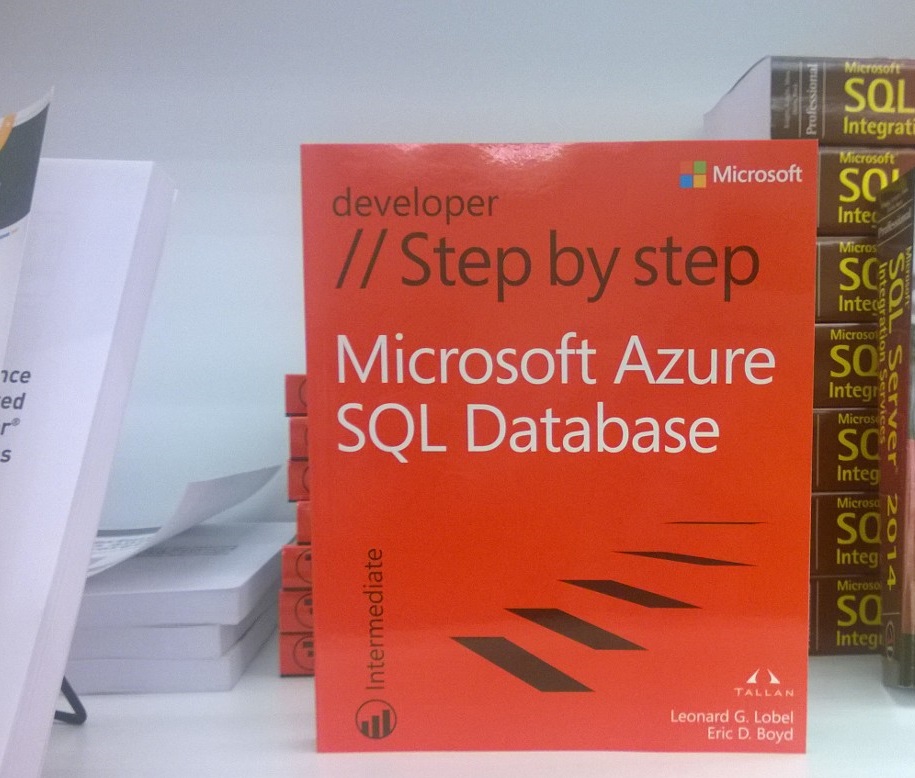
Just Published: Microsoft Azure SQL Database Step by Step

I’m extremely pleased to announce that my new book on Microsoft Azure SQL Database has just been published! The book, part of the Microsoft Press “Step By Step” series, is designed for readers to quickly get productive with Microsoft Azure SQL Database — the cloud version of SQL Server.
WP_20140713_001

I’m especially lucky to have worked with Eric Boyd, who has co-authored the book with me. Eric has great knowledge and experience with the Azure platform, which really shines through in his chapters.

So who is this book for? Well, anyone interested in quickly getting up and running with SQL Database on Microsoft Azure. This includes not only those experienced with SQL Server, but readers having general experience with other database technologies, and even those with little to no experience at all. The Step By Step series follows an inviting format that’s chock full of quick rewards — small bits of conceptual information are presented, and that information is then immediately put to practical use by walking through a relatively short procedure, one step at a time.

Here are just some of the great things we cover:

  • Quick-Start, Setup, and Configuration
  • Security in the cloud
  • Reporting Services in the cloud
  • SQL Data Sync
  • Migration and Backup
  • Using the online management portal, and familiar tools like SSMS and SSDT
  • Programming using such tools as the Entity Framework ORM layer
  • Scalability and Performance
  • Differences from on-premise SQL Server

Of course, even as these pages come hot off the press, Azure continues to evolve. On to the next edition?…

 

Observations of a SQL Saturday Speaker

I enjoy speaking at SQL Saturday events every chance I get. I’ve spoken at well over a dozen of them by now, both in the U.S. and abroad. Every SQL Saturday is different, and that’s part of the charm of course. Organizers (all volunteers) work hard to make sure everything runs smoothly. Still, on occasion, problems can arise, and in some cases, these are problems that can be avoided. For you SQL Saturday organizers out there planning your next event, here are some tips based on personal experience that can help ensure success:

  • Notify speakers of agenda changes
    • On occasion, the agenda needs to be changed, which is understandable. However, if this happens, always be sure to notify the affected speakers (or all speakers). This is especially important when the changes are last-minute. Don’t assume speakers double-check the web-site to look for last-minute changes the day before your event
  • Don’t assume all speakers are local
    • When providing directions, don’t use general references like “the east entrance of the parking garage.” Out-of-towners tend to be directionally challenged!
  • Include proper location details
    • Be as specific as possible and include all relevant details, such as the floor, when pertinent. If the event is being hosted at a university, don’t just advertise the general address for the entire campus; specify the exact building address or building name.
  • Provide organizer contact phone number
    • Having no one to call in the event of a problem right before (or during) the event can pile more stress on an already stressful situation. Make sure that every speaker has a name and phone number they can contact if necessary.
  • Don’t assume every shows up in the morning
    • Very often, SQL Saturday signs are placed near and around the venue. These signs are very helpful, so they shouldn’t be taken down in the middle of the day. Some attendees (and speakers) make only be able to arrive for the latter part of the day, and they also need to benefit from the signs.


Book Announcement! Windows Azure SQL Database – Step By Step

Just when I thought it was safe to go back in the water…

I’m very happy to announce that I’ll be authoring a new book on Windows Azure SQL Database. The book, part of the Microsoft Press “Step By Step” series, is designed for readers to quickly get productive with Windows Azure SQL Database — the cloud version of SQL Server.

I’m especially lucky and honored to work with my friend and collegue Brian Reynolds, who is co-authoring the book with me. Brian has great knowledge and experience with the Windows Azure platform, which is sure to shine through in his chapters. Plus, I’m once again delighted to work in partnership with Craig Branning and all the wonderful folks at Tallan, Inc.

So who is this book for? Well, anyone interested in quickly getting up and running with SQL Database on Windows Azure. This includes not only those experienced with SQL Server, but readers having general experience with other database technologies, and even those with little to no experience at all. The Step By Step series follows an inviting format that’s chock full of quick rewards — small bits of conceptual information are presented, and that information is then immediately put to practical use by walking through a relatively short procedure, one step at a time.

I’m also happy that the title will once again be published by O’Reilly Media and branded as an MS Press book. Years back, O’Reilly acquired MS Press, but retained the Microsoft logo with the black and red theme, which I think we all agree looks really, really cool.

So (once more!) busy days lie ahead. We’re still in the early stages, so some of this could easily change somewhat, but here’s what we have planned so far to cover:

  • Quick-Start, Setup, and Configuration
  • Security in the cloud
  • Reporting Services in the cloud
  • SQL Data Sync
  • Migration and Backup
  • Using the online management portal, and familiar tools like SSMS and SSDT
  • Programming using such tools as the Entity Framework ORM layer
  • Scalability, Federations, and Performance
  • Differences from on-premise SQL Server

With luck, the book should be out by Q3 2013. I’m looking forward to the work in store, and we hope to produce the best piece of work we can. Along the way, I’ll be blogging more previews of what’s to come. So stay tuned, and thanks for reading.

Download Visual Studio Live! New York Slides and Code

A very successful Visual Studio Live! just wrapped up two weeks ago here in my hometown of Brooklyn, NY. Thanks again to all the good folks that attended my sessions.

As promised, I’ve posted all the slides and code from my sessions for you to download. You can grab the stuff here:

May 14, 2012 SQL Server Workshop for Developers http://sdrv.ms/VSLiveNY2012SQL
May 17, 2012 Introducing SQL Server Data Tools http://sdrv.ms/VSLiveNY2012SSDT
May 17, 2012 T-SQL Enhancements in SQL Server 2012 http://sdrv.ms/VSLiveNY2012TSql

Looking forward to Visual Studio Live! in Redmond this coming August! 🙂

Download Visual Studio Live Las Vegas and SQLBits London Slides and Code

I just returned from Visual Studio Live (Las Vegas) and SQLBits (London), and both shows were very successful. Thanks again to all the good folks that attended my sessions, your positive energy was amazing and I hope you had as much fun as I did.

As promised, I’ve posted the slides and code from all my sessions for you to download. You can grab the stuff here:

Visual Studio Live (Las Vegas)

Mar 26, 2012 SQL Server Workshop for Developers http://sdrv.ms/VSLiveVegas2012SQL
Mar 27, 2012 Introducing SQL Server Data Tools http://sdrv.ms/VSLiveVegas2012SSDT
Mar 27, 2012 Understanding Your .NET Data Access Choices http://sdrv.ms/VSLiveVegas2012DataAccess

SQLBits (London)

Mar 29, 2012 SQL Server Workshop for Developers http://sdrv.ms/SQLBits2012WorkshopForDevelopers
Mar 30, 2012 Native File Streaming http://sdrv.ms/SQLBits2012NativeFileStreaming

Looking forward to Visual Studio Live (New York) next month, to be held right here in my hometown Brooklyn, NY! 🙂


Download VSLive Orlando SQL Server 2012 Workshop Materials

I just got back from another great VSLive! A special thanks to all the attendees who were at my SQL Server workshop on Monday. You guys had great questions and were a lot of fun. As promised, I’ve posted the very latest version of my slides and code for you to grab right here:

http://bit.ly/VSL2011SQLOrlando

If you missed VSLive! in Orlando, catch us in Vegas next March. In addition to the full-day SQL 2012 workshop, I’ll be giving breakout sessions on SQL Server Data Tools (SSDT) and .NET 4.0 Data Access. Enjoy!

Book Announcement! Introducing “Programming Microsoft SQL Server 2012”

I’m very happy to announce that I’ll be authoring a new book on SQL Server 2012, code-named “Denali.” The full title, “Programming Microsoft SQL Server 2012” will technically be published by O’Reilly, yet it will be branded as a Microsoft Press book. O’Reilly recently acquired MS Press, but retained the Microsoft logo and black/red theme, which I’m really glad about. Although O’Reilly is a big name, the MS Press branding still carries more clout. And to be honest, I greatly prefer having a cool tool to a weird animal on the cover.

This book is an update to the SQL Server 2008 edition I wrote three years ago, with many similarities but also some very notable differences. I’m extremely pleased to once again team together with Andrew Brust, who will be writing the chapters on SQL CLR, column stores, BI, and SQL Azure. Andrew was my co-author for the 2008 edition and lead author of the original 2005 edition, so this is actually his third time around on this book. Both previous editions literally burst at the seams in their zeal to cover the entire SQL Server stack. This time around, in consideration of the many readily available BI-focused books, the editors decided to distill the BI footprint of the new Denali book (which accounted for roughly a whole third of the previous 1,000+ page 2008 edition) down to a single overview-style chapter. This simultaneously brings the page count down a little, while actually opening more space for expanded coverage of the relational database engine. As a result, this new book is more narrowly (and uniquely) focused on programming SQL Server for transactional line-of-business applications built with .NET and Visual Studio.

So busy days lie ahead. I’ve actually spent nearly a year already gearing up on Denali, since attending the Denali SDR in Redmond last October. Here are just some of the new topics planned for the 2012 edition:

  • SQL Server Data Tools
  • SQL Azure
  • Column store indexes
  • Sequences
  • Windowing function (OVER BY) improvements
  • Server-side paging
  • FileTable (FILESTREAM + hierarchyid = logical file system)
  • Metadata discovery
  • Spatial enhancements (curves, FULLGLOBE)
  • Contained Databases
  • Self-Service Reporting (Crescent)
  • Entity Framework & LINQ
  • WCF Data Services & WCF RIA Services

This list is by no means exhaustive, and may still change, but it does give a good idea of what to expect. Also, this is in addition to updated coverage from the previous edition that includes broader treatment of topics such as table-valued parameters, SQL Server Audit, and more.

With luck, the book should be out by Q2 2012. I’m looking forward to the work in store, and hope to produce the best piece of work I can. Along the way, I’ll be blogging more previews of what’s to come. So stay tuned, and thanks for reading.

Download VSLive Redmond SQL Server Workshop Materials

Visual Studio Live just wrapped up in Redmond, and it was a very successful conference. As promised, I’ve posted the slides and code for my SQL Server workshop for you to download. You can grab the stuff here:

http://bit.ly/VSL2011SQLRedmond

Thanks to the great crowd we had on Friday. You guys were a lot of fun, and now I’m looking forward to doing it again in Orlando in December!

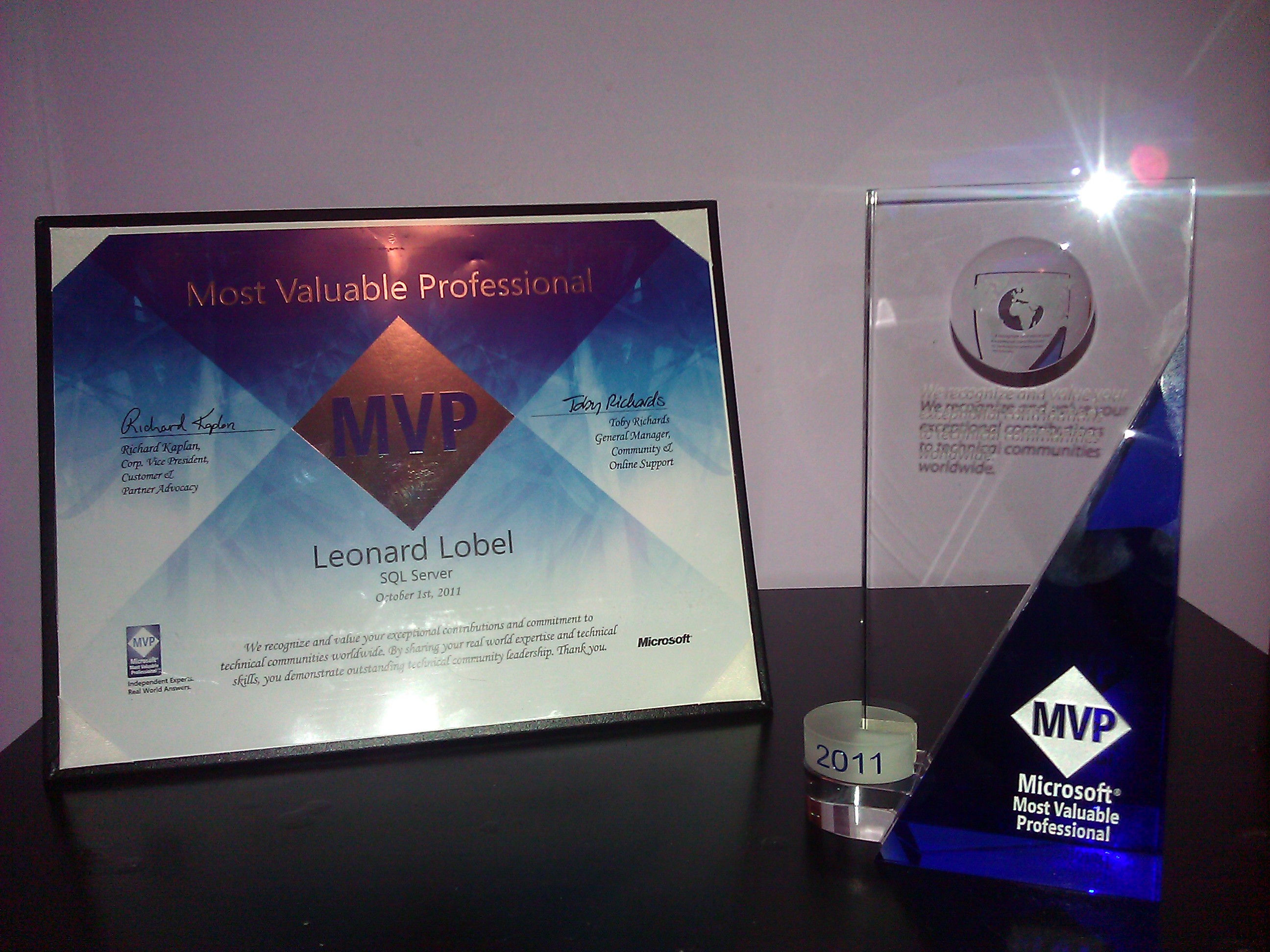
Received Microsoft 2011 MVP Award for SQL Server!

I’m extremely happy to announce that I’ve just earned Microsoft’s 2011 MVP (Most Valuable Professional) Award for SQL Server! My MVP profile is online at https://mvp.support.microsoft.com/profile/Lobel.

Microsoft recognizes independent software professionals who actively share their expertise and knowledge throughout the technical community with the MVP award. There are just over 4,000 MVPs worldwide, of which there are only 279 MVPs for SQL Server (as of October 2011). So it’s a great thrill and honor for me to join this very select group of dedicated individuals.

There’s nothing I enjoy more than helping other developers learn and grow, and that’s exactly what the MVP award is all about. So thanks to all of you out there for your readership, and I look forward to many more years of speaking and writing on SQL Server, .NET, and all things Microsoft!

Community Service Week

Next week, I’ll be presenting on SQL Server Developer Tools (SSDT) at two SQL Server User Groups. Will I see you there?

If you haven’t already heard, SSDT is the newest SQL Server development environment in Visual Studio 2010, released as part of SQL Server 2012 (codename “Denali”). You can download the current CTP3, but Juneau is not included with the Denali CTP3 bits. Instead, it’s a separate download via the Web Platform Installer at: http://www.microsoft.com/web/gallery/install.aspx?appid=JUNEAU10.

You can get a primer on SSDT by reading my earlier introductory blog post. Hopefully that inspires you to come meet me in NJ or NYC next week to get an up-close look at SSDT with lots of demos. Session abstract below. Hope to see you!

Introducing SQL Server Developer Tools (codename “Juneau”)

With the upcoming release of SQL Server 2012 (codename “Denali”), SQL Server Developer Tools (SSDT, codename “Juneau”) will serve as your primary development environment for building applications with SQL Server. While SQL Server Management Studio (SSMS) continues to serve as the primary tool for database administrators, SSDT represents a brand new experience. SSDT plugs in to Visual Studio and provides a new SQL Server node in Server Explorer for connected development of on-premises or cloud databases, and also provides a new database project type for offline development.

With SSDT, developers can finally enjoy building applications without constantly switching between Visual Studio and SSMS. In this session, Lenni will demonstrate how SSDT can be used to develop for (and deploy to) on-premise and SQL Azure databases. In addition to replicating most of the functionality found in SSMS, you will learn how to use features such as code navigation, IntelliSense, and refactoring with your database model-indispensable tools previously available only for traditional application development in Visual Studio. We’ll also cover the new declarative model that allows you to design databases offline and under source control right from within your solution in Visual Studio. Don’t miss out on this demo-centric information-packed session on the next generation of database development tools for SQL Server!