

Happy New Year!
I’ve got a juicy SQL Server post for you to ring in the new year – Transparent Data Encryption, available only in SQL Server 2008 Enterprise edition. This is good and powerful stuff that works, folks, so check it out here.
Sensitive information (passwords, credit card numbers, salary information, and so on) in your database needs to be encrypted. As of SQL Server 2005, you can encrypt and decrypt sensitive data columns in your tables using symmetric keys. You identify the columns that will hold sensitive information, and then invoke ENCRYPTBYKEY to store data in those columns, and DECRYPTBYKEY to retrieve data from those columns. The process is fairly straightforward, but it does require programming in your application for each encrypted column.
In SQL Server 2008 (Enterprise edition only), Microsoft has added a new feature called Transparent Data Encryption (TDE). This feature automatically encrypts the entire database (data and log files), as well as database backups, without requiring any programming or code changes to your application. The process is entirely transparent, hence the name Transparent Data Encryption. In this blog post, I’ll explain TDE, and demonstrate how to use this new security feature.
(Note that the NTFS file system in Windows Server 2000 and later provides a feature called Encrypted File System [EFS]. This feature also applies transparent encryption to any data stored on the hard drive, but it will not protect databases or backups that have been copied onto a CD or other media. TDE in SQL Server 2008 is based on a certificate that is needed to decrypt or restore any encrypted database, regardless of where the data is transferred.)
When TDE is first enabled for a specific database, SQL Server encrypts the database in the background. During this process, the database remains online and responsive to client requests (similarly, when encryption is disabled, SQL Server decrypts the database in the background). Encryption is performed at the page level, and does not increase the size of the database in any way. Once the entire database is encrypted, new data gets encrypted on the fly as it is written to disk, and all data gets decrypted when read back.
Multiple Protection Layers
Databases protected with TDE are encrypted with a Database Encryption Key (DEK). You create the DEK and store it in the database, but the DEK itself is associated with a certificate that you create separately in the master database. This means that a backup of the database includes the DEK, but doesn’t include the certificate upon which the DEK is based. Hence, TDE database backups are useless to prying eyes, since they cannot be restored without the certificate. Finally, the certificate itself is encrypted by the Service Master Key (SMK), also contained in the master database.
To get started, you’ll need to create an SMK, if your server doesn’t have one already. Then you can create a certificate for TDE that is encrypted by the SMK which can be used to create one encrypt one or more DEKs. Finally, you create a DEK against the certificate in each database to be encrypted and then enable encryption on the database.
The following diagram illustrates how TDE might be used to encrypt two databases on one server instance:
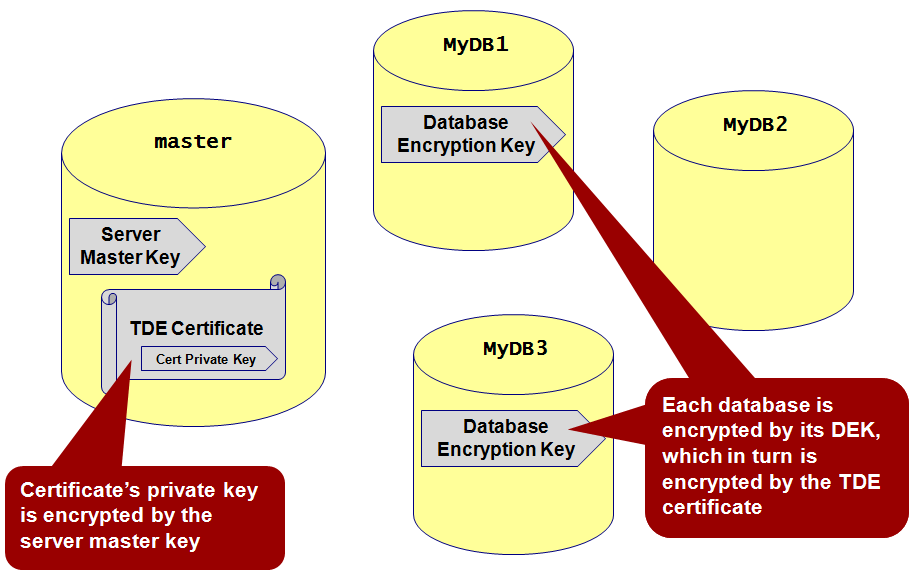
In this diagram, you can see that the master database holds the SMK (there can be one and only one SMK on any server instance). The master database also holds a certificate whose private key is encrypted by the SMK. The two databases MyDB1 and MyDB3 are each encrypted with DEKs that are, in turn, encrypted by the certificate. The DEKs are entirely dependent on the certificate, so copying or restoring these databases to another server instance without also transferring the certificate upon which the DEKs are based yields a totally unusable database.
Creating a Service Master Key (SMK)
If your server already has an SMK, you can skip this step. An SMK can only be created in the master database, and there can only be one SMK per server instance. If you don’t already have an SMK, you can create one as follows:
USE master
GO

CREATE MASTER KEY
  ENCRYPTION BY PASSWORD = 'Hrd2GessP@$$w0rd!'
Creating a TDE Certificate
In general, certificates can be created in any database. However, certificates used for TDE must be created in the master database. It should be fairly obvious why the certificates used to encrypt DEKs in each encrypted database are stored outside the encrypted database in master (you wouldn’t want them stored in the encrypted database, as that would defeat the whole protection scheme!)
USE master
GO

CREATE CERTIFICATE MyEncryptionCert
  WITH SUBJECT = 'My Encryption Certificate'
You can then query the sys.certificates view to confirm that the certificate has been created, as follows:
SELECT name, pvt_key_encryption_type_desc FROM sys.certificates
  WHERE name = 'MyEncryptionCert'
The output confirms that the certificate was created and that its private key is protected by the master key, as shown here:
name                             pvt_key_encryption_type_desc
-------------------------------- ----------------------------------
MyEncryptionCert                 ENCRYPTED_BY_MASTER_KEY

(1 row(s) affected)
Creating a Database Encryption Key (DEK)
Each database to be encrypted requires its own DEK, and each database’s DEK is in turn encrypted by the TDE certificate we just created in the master database. When creating the DEK, you can specify a particular encryption algorithm to be used. Supported algorithms include AES_128, AES_192, AES_256, TRIPLE_DES_3KEY. The DEK protects not only the data and log files, but backups too. Attempting to restore an encrypted database without the certificate is an exercise in futility. The following T-SQL code creates a DEK for the MyDB database that specifies 128-bit encryption:
USE MyDB
GO

CREATE DATABASE ENCRYPTION KEY
  WITH ALGORITHM = AES_128
  ENCRYPTION BY SERVER CERTIFICATE MyEncryptionCert
Notice the ENCRYPTION BY SERVER CERTIFICATE clause that references the TDE certificate MyEncryptionCert we just created in the master database. This means that the MyEncryptionCert certificate must be present and available in the master database of the same server instance as MyDB, or the database will be rendered inaccessible.
(Because we have not yet backed up the TDE certificate, SQL Server issues a warning at this time alerting you to the fact that the certificate being used to encrypt the DEK has not been backed up. This warning should be taken seriously, since you will not be able to access any database encrypted by the DEK without the certificate. Should the certificate be lost or damaged, your encrypted databases will be completely inaccessible. Later in this post, I will show you how to back up and restore the certificate.)
Enabling TDE
With the SMK, certificate, and DEK prepared, you can start transparent data encryption on the database using the ALTER DATABASE…SET ENCRYPTION ON statement. For example:
ALTER DATABASE MyDB SET ENCRYPTION ON
That’s all there is to it! From this point forward, the database and all of its backups will be encrypted. If an unauthorized party somehow gains access to the physical media holding any backups of MyDB, the backups will be useless without the certificate protecting the DEK.
Querying TDE Views
You can query the catalog view sys.databases to see which databases are protected by TDE. For example:
SELECT name, is_encrypted FROM sys.databases
The query results show that MyDB is the only encrypted database on the server:
name                           is_encrypted
------------------------------ ------------
master                         0
tempdb                         0
model                          0
msdb                           0
ReportServer                   0
ReportServerTempDB             0
MyDB                           1

(7 row(s) affected)
This output is somewhat misleading, however, since encrypting one or more databases results in the encryption of tempdb as well. This is absolutely necessary since tempdb is shared by all databases, and SQL Server must therefore implicitly protect temporary storage placed into tempdb by databases encrypted by TDE. But because the encryption in tempdb is implicit, is_encrypted is returned as 0 (false) by sys.databases for tempdb (you’ll see next that SQL Server does actually create DEK for tempdb). This can have an undesirable performance impact for unencrypted databases on the same server instance. For this reason, you may wish to consider isolating separate SQL Server instances; one for encrypted databases and one for non-encrypted databases.
You can also query the dynamic management view sys.dm_database_encryption_keys to see all the DEKs and to monitor the progress of encryption (or decryption, when you disable TDE) running on background threads managed by SQL Server. This view returns the unique database ID that can be joined on sys.databases to see the actual database name. For example, if we run the following query after enabling TDE, we can obtain information about the DEK and background encryption process:
SELECT
   dbs.name,
   keys.encryption_state,
   keys.percent_complete,
   keys.key_algorithm,
   keys.key_length
 FROM
   sys.dm_database_encryption_keys AS keys
   INNER JOIN sys.databases AS dbs ON keys.database_id = dbs.database_id
If this query is executed after we enable TDE but before SQL Server has completed encrypting the entire database in the background, we get results similar to the following:
name       encryption_state percent_complete key_algorithm    key_length
---------- ---------------- ---------------- ---------------- -----------
tempdb     3                0                AES              256
MyDB       2                78.86916         AES              128

(2 row(s) affected)
The value returned by encryption_state tells you the current status of encryption (or decryption), as follows:
1 = Unencrypted
2 = Encryption in progress
3 = Encrypted
4 = Key change in progress
5 = Decryption in progress (after ALTER DATABASE…SET ENCRYPTION OFF)
Certain database operations cannot be performed during any of the “in progress” states (2, 4, or 5). These include enabling or disabling encryption, dropping or detaching the database, dropping a file from a file group, taking the database offline, or transitioning the database (or any of its file groups) to a READ ONLY state. Also note the implicit DEK for tempdb created by SQL Server, which always uses AES_256 encryption.
Backing Up the Certificate
It is extremely important to back up the server certificates you use to encrypt your databases with TDE. Without the certificate, you will not be able to access the encrypted database or restore encrypted database backups (which, of course, is the point of TDE). Attempting to restore an encrypted database without the certificate will fail with an error similar to this from SQL Server:
Msg 33111, Level 16, State 3, Line 1
Cannot find server certificate with thumbprint '0x6B1FEEEE238847DE75D1850FA20D87CF94F71F33'.
Msg 3013, Level 16, State 1, Line 1
RESTORE DATABASE is terminating abnormally.
Use the following statement to back up the server certificate to a file. In addition to the certificate itself, the certificate’s private key must also be saved to a file and protected with a password:
BACKUP CERTIFICATE MyEncryptionCert TO FILE='C:\MyEncryptionCert.certbak'
 WITH PRIVATE KEY (
  FILE='C:\MyEncryptionCert.pkbak',
  ENCRYPTION BY PASSWORD='Pr!vK3yP@ssword')
This statement creates two files: MyEncryptionCert.certbak is a backup of the server certificate, and MyEncryptionCert.pkbak is a backup of the certificate’s private key protected with the password Pr!vK3yP@ssword. Password protection is absolutely required when backing up the certificate’s private key. Both of these files and the password will be needed to restore an encrypted database backup onto another server or instance. At the risk of stating the obvious, these backup files and the private key password should be closely safeguarded.
Restoring the Certificate
Before an encrypted database can be restored elsewhere, the server certificate that its DEK is encrypted by must be restored first. And if the target instance does not have a master key, one must be created for it before the server certificate can be restored, as shown here:
USE master

GO
CREATE MASTER KEY ENCRYPTION BY PASSWORD = 'An0thrHrd2GessP@ssw0rd!'
To restore the server certificate from the backup files we made earlier, use an alternative form of the CREATE CERTIFICATE statement, as follows:
CREATE CERTIFICATE MyEncryptionCert
 FROM FILE='C:\MyEncryptionCert.certbak'
 WITH PRIVATE KEY(
  FILE='C:\MyEncryptionCert.pkbak',
  DECRYPTION BY PASSWORD='Pr!vK3yP@ssw0rd')
This statement restores the MyEncryptionCert server certificate from the certificate backup file MyEncryptionCert.certbak and the certificate’s private key backup file MyEncryptionCert.pkbak. Naturally, the password provided in the DECRYPTION BY PASSWORD clause must match the one that was used when the certificate’s private key was backed up or the certificate will fail to restore. With a successfully restored certificate, you can then restore the backup of any encrypted database whose DEK is based on the MyEncryptionCert certificate.
Summary
With the growing concern about personal data protection and the proliferation of computer viruses, developing a methodology for secure computing continues to be a vital task for developers. With support for Transparent Data Encryption in SQL Server 2008, you can easily implement an additional layer of security by encrypting your entire database without making any code changes in your application. Now go give it a try, and enjoy!